.webp)
Free MLOps Course for Data Scientists: Day 4 - Feature Store, Model Registry and Experiment Tracking
A practical guide to feature stores, experiment tracking, and model registry for Data Scientists: what each component does, when to use them, and how they connect in a production ML system.

Welcome to Day 4 of my 5-day MLOps Course for Data Scientists.
Day 1 - Production ML System Components
Day 2 - Databases and Data Processing
Day 3 - Machine Learning Pipelines
In this lesson, we cover three more components that are important parts of most Production ML systems.
You already know how features are built and how models are trained. Now we look at where features are stored and served, how models are versioned and promoted, and how every training run gets tracked so you can reproduce and compare results later.
These three components are the Feature Store, the Model Registry, and Experiment Tracking.
1. Feature Store
The feature store is the central hub for managing ML features. It solves one of the biggest problems in production ML systems which is ensuring that the same features used during model training are consistently available for inference.
It acts as a bridge between raw/preprocessed data and the ML models, enabling feature standardization, reusability, and governance.
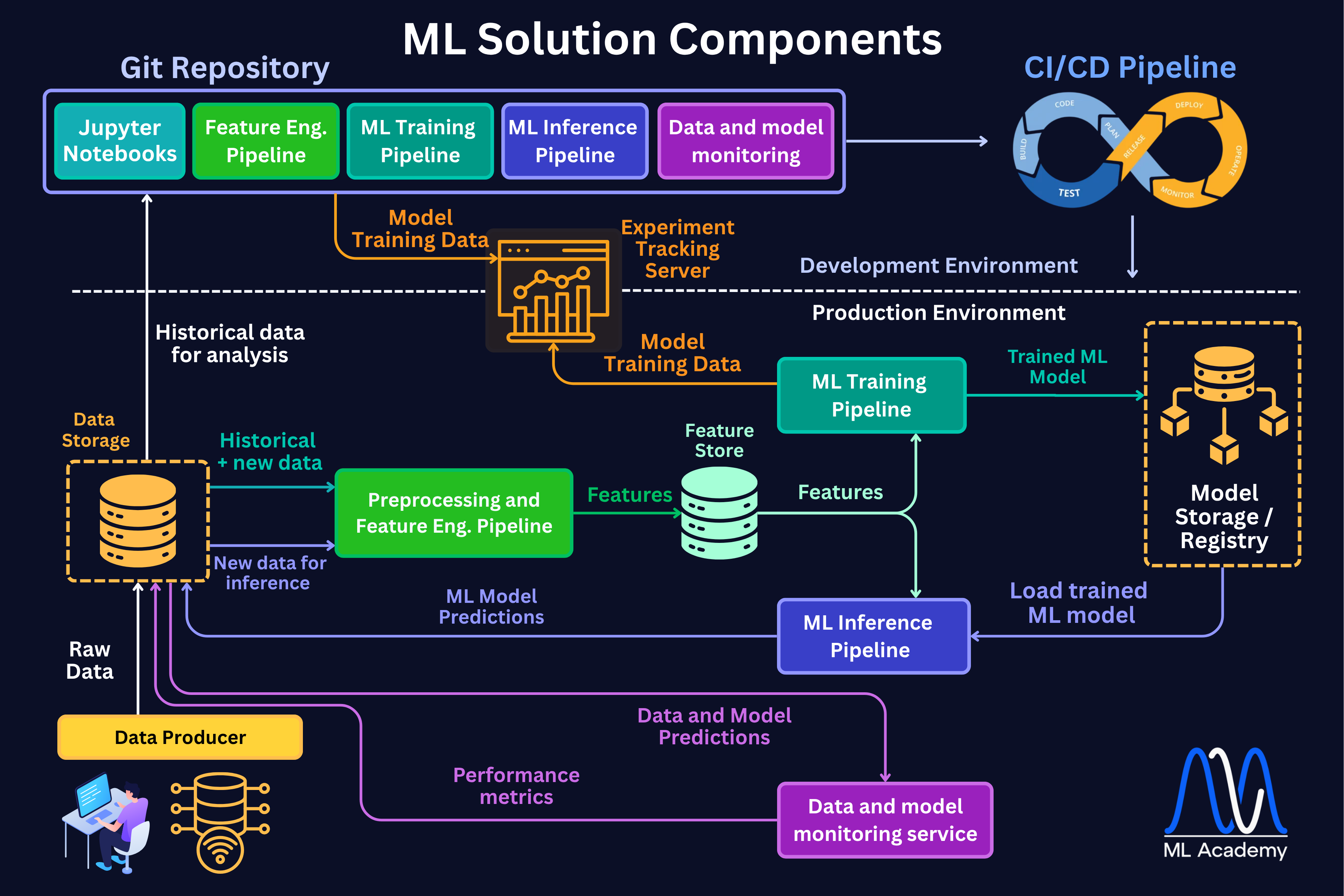
In the figure below you can see where a Feature Store fits within a typical ML Application architecture.
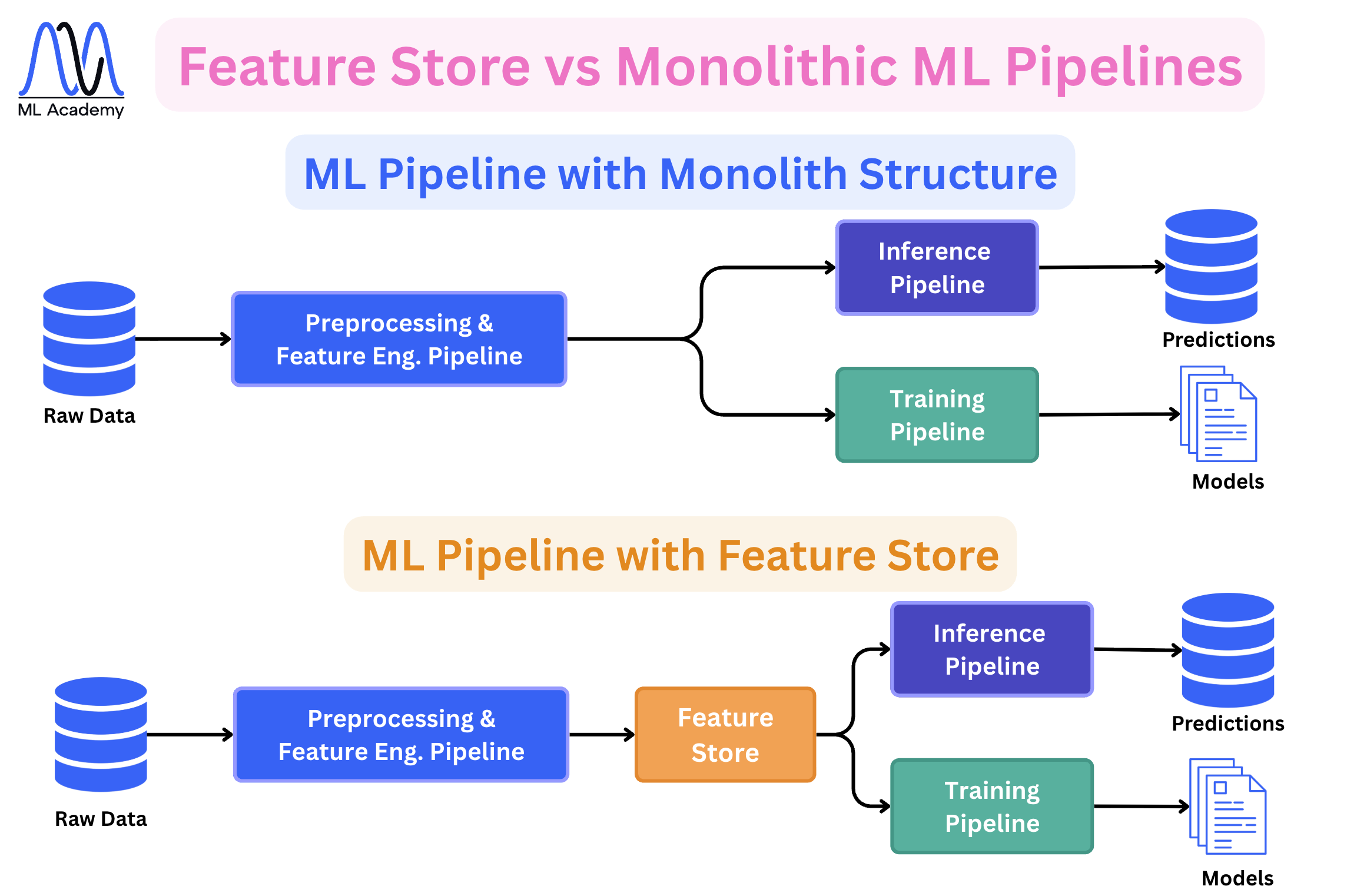
In many cases, Feature Stores are not used and that’s fine. In this case, the features are consumed by the Training and Inference Pipelines directly after a Feature Engineering Pipeline. In the figure below, you can see the difference between a Monolithic ML Pipeline structure and the one with a Feature Store.
What’s inside a Feature Store
A Feature Store is not a single database. It is a system made up of several components, each serving a different role in how features are stored, managed, and served.
Here’s an overview of a typical feature store architecture.
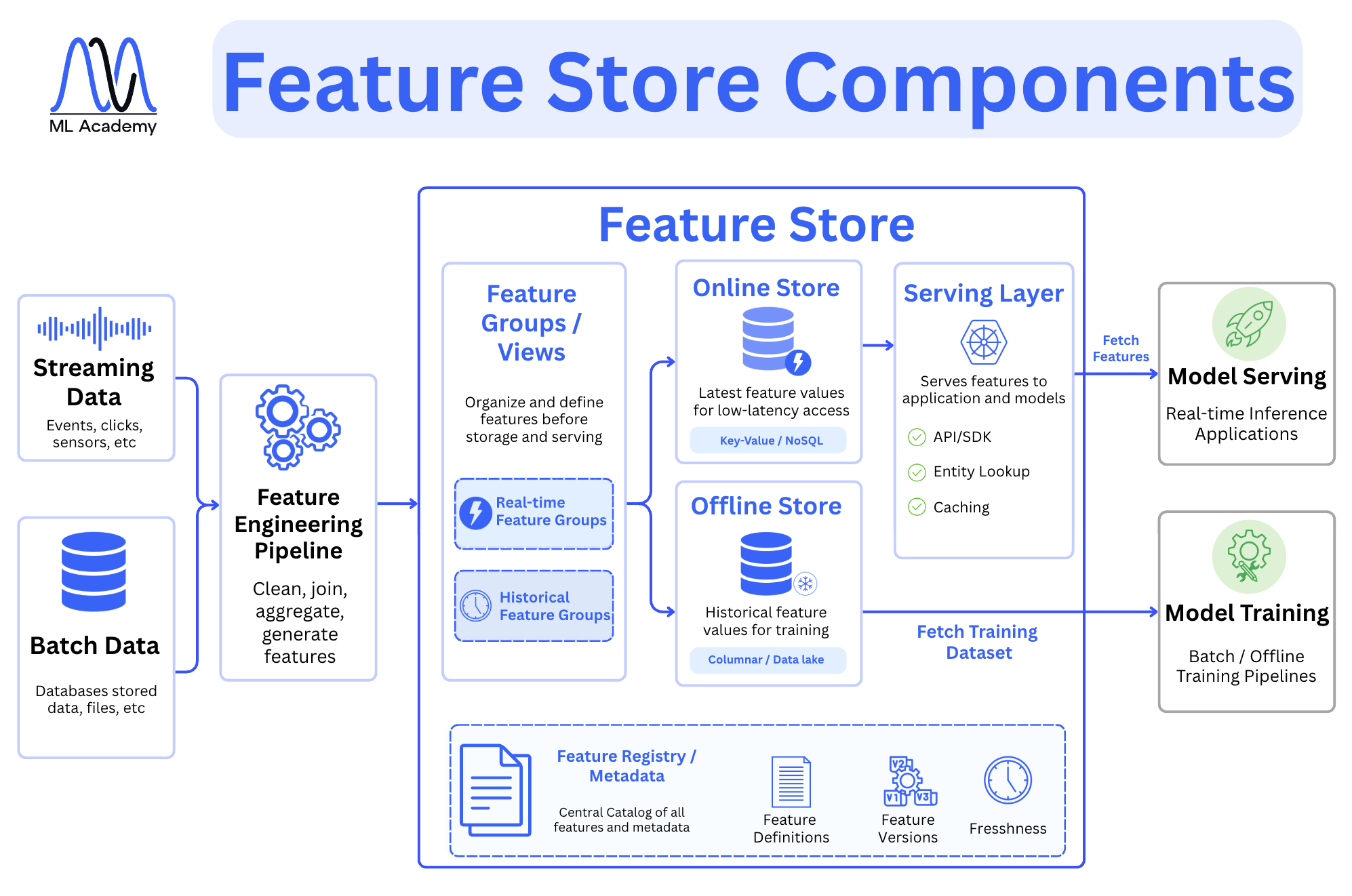
The entry point is the Feature Engineering Pipeline. It usually takes data from two sources such as streaming data like events, clicks, and sensor readings, and batch data from databases and files. It then transforms it into features. What comes out of that pipeline goes into the Feature Store itself.
Inside the store, features are first organized through Feature Groups and Views. This is where you define and structure features before they are stored or served.
There are two kinds of feature groups: real-time feature groups, which hold features computed from streaming data, and historical feature groups, which hold features computed from batch data.
From there, data splits into two storage layers. The Online Store holds the latest feature values and is built for low-latency access, typically backed by a key-value or NoSQL database like Redis. The Offline Store holds historical feature values used for training, typically backed by a columnar store, a data lake or other relevant databases depending on the data types.
Access to these stores is handled by the Serving Layer. For model serving and real-time inference, the serving layer fetches features from the Online Store via API or SDK, and it handles entity lookup and caching.
For model training, the serving layer pulls historical datasets from the Offline Store and passes them to the training pipeline.
At the bottom sits the Feature Registry, which is the central catalog of all features and their metadata. It tracks feature definitions, feature versions, and feature freshness. Without this, you lose visibility into what features exist, how they were computed, and whether they are still current.
Together, these components ensure that the same feature logic used during training is available during inference, which is the core problem the Feature Store exists to solve.
Example of a Feature Store in a real-world ML System
To better understand how a Feature Store fits real-world ML Systems, let’s consider a Video Recommendation ML System below.
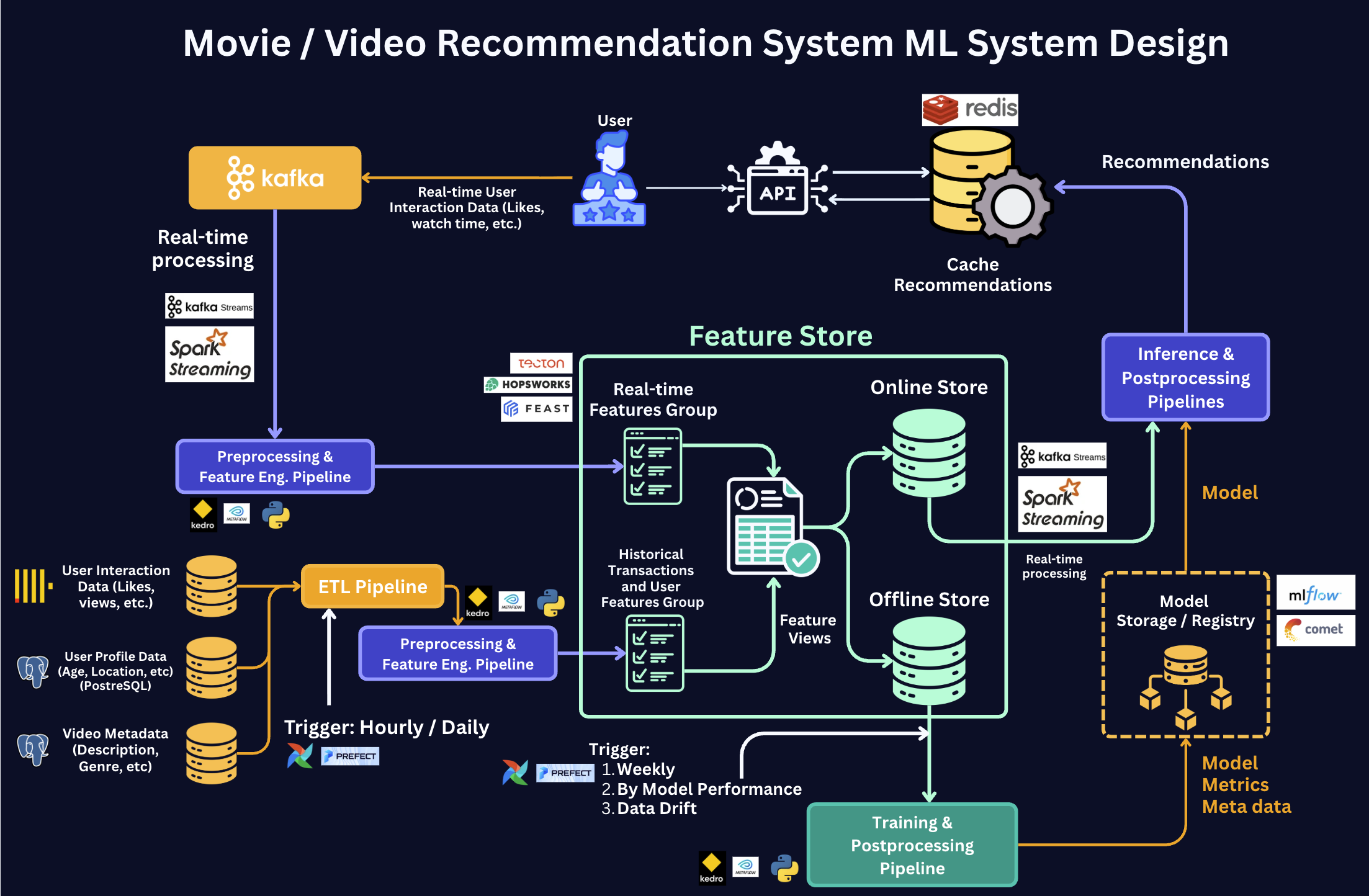
Here's the step-by-step of what happens in the diagram:
Step 1 — Batch ingestion (bottom).
The ETL Pipeline pulls user profiles, video metadata, and historical interactions from source databases. The Preprocessing & Feature Engineering Pipeline transforms them and writes the result to the Offline Store as the Historical Transactions & User Features Group.
Step 2 — Real-time ingestion (top).
Live user interactions (likes, watch time) stream in through Kafka. Spark Streaming / Kafka Streams processes them and writes the result to both stores — to the Online Store as the Real-time Features Group for immediate serving, and to the Offline Store so the same events become part of future training data.
Step 3 — Feature Views.
Both stores expose features through a single layer called Feature Views. A Feature View is one definition of a feature (e.g., a user's 7-day average watch time) backed by both stores. Training and serving query the same Feature View, which is what guarantees they see identical features. This is the layer that prevents training-serving skew.
Step 4 — Training.
The Training Pipeline queries Feature Views against the Offline Store, pulls the full history of features, trains the model, and writes the result to the Model Registry.
Step 5 — Serving.
The Inference Pipeline queries the same Feature Views against the Online Store, gets the latest features for one user in milliseconds, loads the model from the registry, and produces recommendations served through the API.
When to use the Feature Store and when not?
Despite a feature store seeming to be a good fit for any production system, it adds real complexity to your system. You should only introduce it when that complexity is justified.
Use a feature store when you need real-time inference with low latency and your features require time-window aggregations — for example, a user's transaction count in the last 10 minutes.
Use it when multiple models across your team depend on the same features and you want to compute them once and reuse them everywhere. Fraud detection and recommendation systems are good examples where a feature store genuinely earns its place.
You probably do not need one when you have a single model running batch inference on a schedule. In that case, a well-structured feature engineering pipeline, versioned training datasets, and proper orchestration are more than enough. Most churn models and demand forecasting systems fall into this category.
Here’s a rule of thumb - if your inference is batch, start without a feature store. If your inference is real-time and your features are shared across multiple models, adding a feature store is worth the investment in the long-term.
2. Experiment Tracking
Every time you train a model, you choose which features to use, which hyperparameters to set, and which preprocessing steps to apply. The problem is that these decisions get forgotten fast, and without a proper system, you end up with something like model_final_FINAL_v3_actually_final.ipynb with no idea what the sequence of steps led you to end up there.
Experiment tracking is the system that records every training run, so you can reproduce, compare, and audit your models later. Let’s check the figure below.
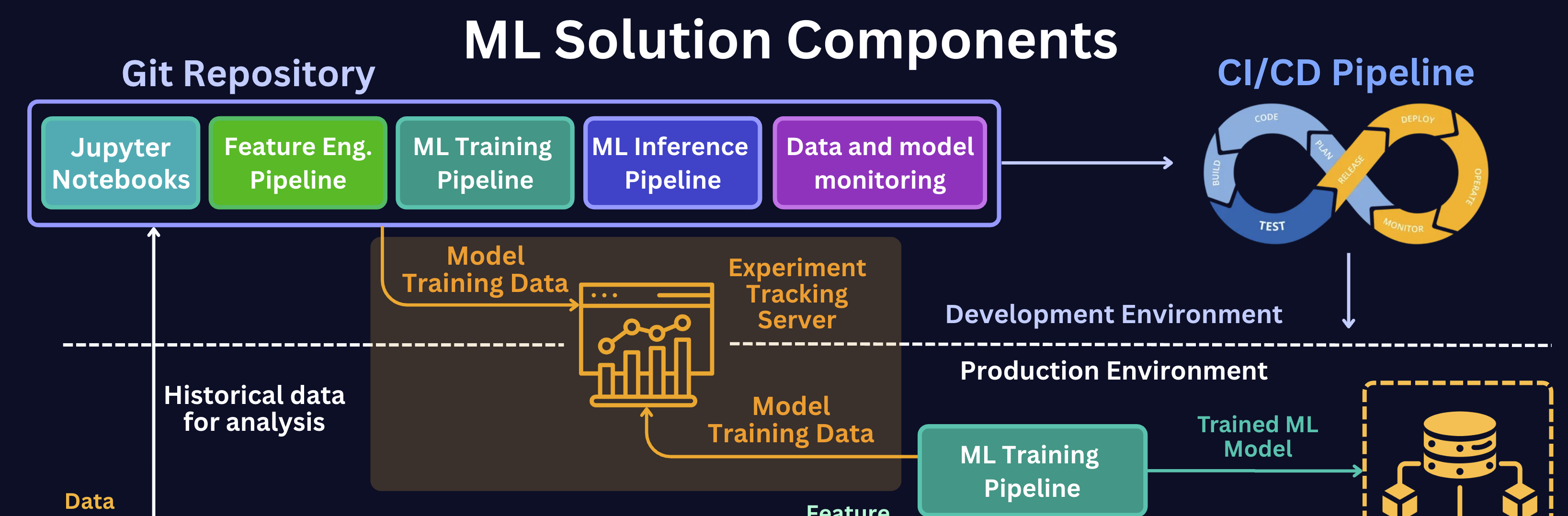
We see that both the Notebooks (where you explore and prototype) and the ML Training Pipeline (where models are produced for real) send their model training data to the tracking server.
The training pipeline in the Production Environment also reports back up to it. In other words, every place a model gets trained — experimental or production — logs to the same central server.
This solves the problem of model results being scattered across notebooks and environments, giving you one source of truth for everything you've ever trained.
Here’s another problem that Experiment Tracking solves. Let’s look at the figure below.
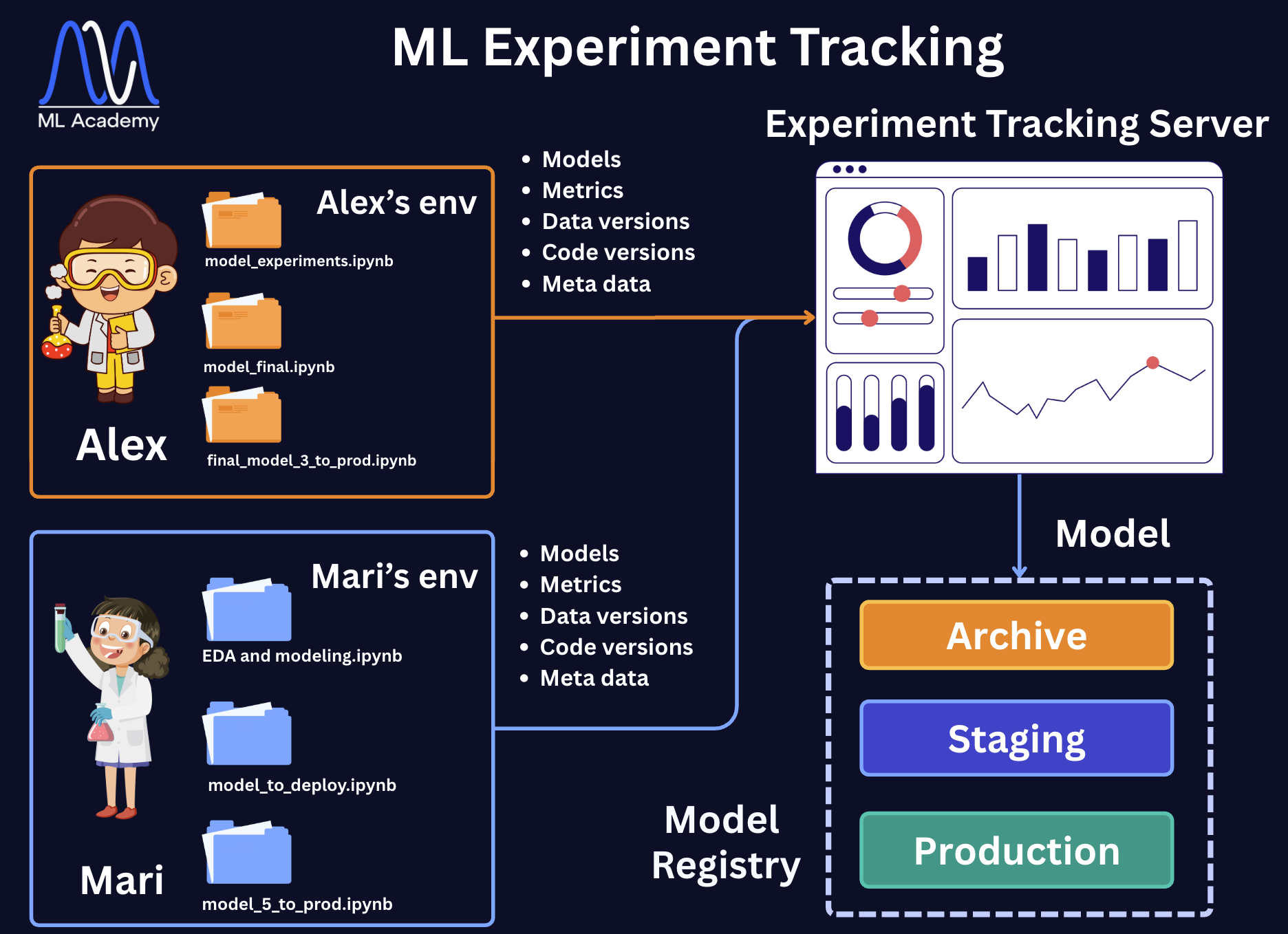
Two data scientists, Alex and Mari, each work in their own environment, with their own folders of notebooks. The problem is that Alex can't see Mari's experiments and vice versa, so there's no shared history, no easy way to compare results across the team, and no single place that holds everything they've both tried.
The fix is on the right side of the figure. Instead of results staying trapped in each person's local files, both Alex and Mari log every run to the shared Experiment Tracking Server. Each run sends the same five things:
- Models — the trained model artifact
- Metrics — train/validation/test scores and curves
- Data versions — a reference to the exact dataset used
- Code versions — the git commit the run came from
- Metadata — hyperparameters, environment, duration, who ran it
The tracking server collects all of this in one place, with dashboards to compare runs side by side. From there, the best model is handed to the Model Registry, where it moves through the stages — Staging → Production → Archive. We discussed these stages in the next section.
How It Works
Here is how it works in practice, using MLflow as an example. Let's look at the figure below.
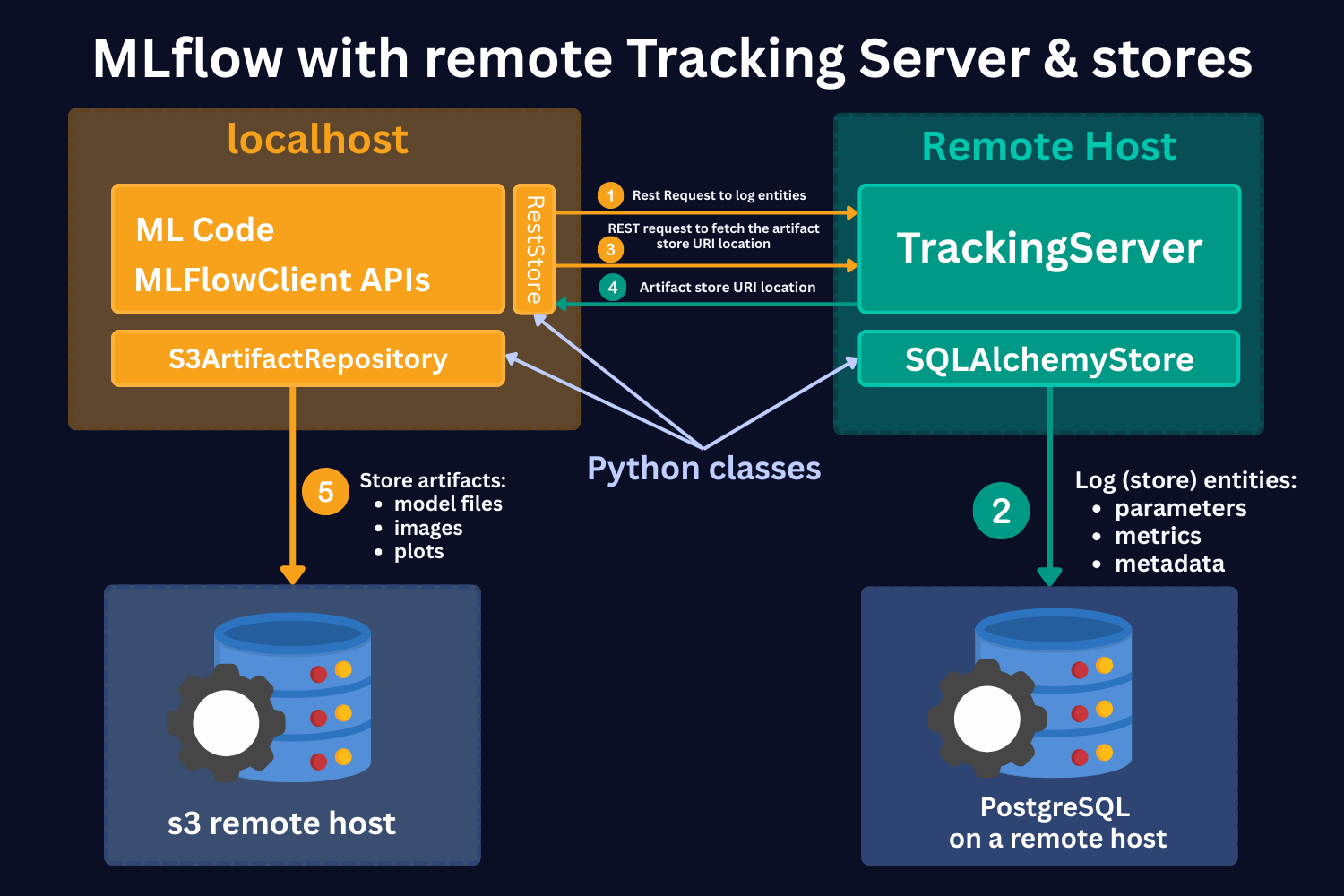
Let’s assume you run your ML code locally. When a training run starts, the MLflow client sends a REST request to the Tracking Server running on a remote host, for example, on AWS.
The Tracking Server logs all entities, like parameters, metrics, and metadata, into a PostgreSQL database on the remote host.
At the same time, the client asks the Tracking Server where to store the model artifacts. The server returns the artifact store URI, and the client uses the S3ArtifactRepository class to write the model files, images, and plots directly to an S3 bucket.
The result is that your code runs locally, but everything it produces lands in a centralized remote storage that your whole team can access.
What to Track
At minimum, track:
- Model file — the trained model artifact
- Training parameters — every hyperparameter used
- Evaluation metrics — train, validation, and test scores
- Code version — git commit the run came from
For full reproducibility and auditability:
- Dataset version — reference to the exact data used for training
- Environment details — Python version and package versions
- Artifacts — confusion matrices, learning curves, fitted scalers, encoders
- Metadata — who ran it, when, how long it took
- Tags — custom labels to make runs searchable and filterable
Tools
The most commonly used tool is MLflow. It is open-source, handles the full model management lifecycle from experiment tracking through to the model registry, and integrates well with training pipelines.
Other options include Weights and Biases, which is popular in the deep learning community, and Comet for LLM-heavy projects.
3. Model Registry
When you train a model, you need somewhere to put it. Ideally, it should not just be a folder on your laptop, but a system that tracks which version is in production, which one is being tested, and which ones you have already retired. That is what a Model Registry is for.
Why Do You Need a Model Registry?
Without a registry, the model in production is just a file someone saved somewhere. This creates three problems.
First, there is no safe way to promote or roll back a model. Going live means copying a file by hand and hoping nothing breaks. Rolling back means finding the old file and hoping it is still there.
Second, there is no reproducibility. If a model starts producing wrong predictions, you need to know exactly which data it was trained on, which hyperparameters were used, and which version of the code produced it. Without a registry, that information lives in someone's notebook or is gone entirely.
Third, there is no single source of truth. Training writes models to one place, inference reads from another, and nobody can confidently answer which model is actually running right now.
A registry solves all three. Training writes to it, inference reads from it by alias, and every version is fully traceable.
In a typical ML solution diagram, a Model Registry sits right between the Training and Inference Pipelines, check out the ML Solution Diagram above.
Usually, the flow is the following:
- The model is trained locally or in the training pipeline.
- The model, its parameters, and metadata are saved to artifact storage.
- The new model is compared against the current production model.
- If it performs better, it moves from Staging to Production and the old model is Archived.
- The new production model is deployed to the inference service through the CI/CD pipeline.
Model Lifecycle Stages
Every model in the registry moves through stages. The three most common ones are:
Staging — the model has been validated and is waiting for review or approval before going live.
Production — the model currently serving predictions in your system.
Archived — a previous production model, kept for rollback and audit purposes.

In newer registries like recent versions of MLflow, stages are handled through aliases. Aliases are movable labels like @challenger and @champion that you attach to a specific version and reassign when you promote or retire a model. The @challenger alias points to the new candidate being evaluated against the current production model, and @champion points to the model currently serving in production.
What to store
Since the goal of the Model Registry is to fully own model versioning and traceability of the model predictions, it usually stores all required information related to the model.
At minimum, store:
- Model artifact — the trained model file (.pkl, .pt, .onnx, etc.)
- Model version — unique identifier for the version
- Training parameters — hyperparameters used during training
- Evaluation metrics — accuracy, F1, AUC, RMSE, etc.
- Source code version — git commit hash
For full reproducibility and auditability:
- Dataset version — versioned dataset or hash used for training
- Environment info — Python version, dependencies, Docker details
- Artifacts — SHAP plots, confusion matrix, logs
- Owner and timestamps — who registered it and when
- Tags and notes — custom labels or business-related metadata
Tools
The most commonly used tools for model registry are the same as for experiment tracking — MLflow, Weights and Biases, Neptune.ai, and Comet. In practice, you use the same tool for both because the registry is a natural extension of the tracking system.
Summary
In this lesson, we covered three components that sit between your pipelines and your production system.
The Feature Store is the layer that ensures the features used during training are the same ones available during inference. It splits into an Offline Store for historical data and training, and an Online Store for low-latency serving. We discussed that not every system needs one. For example, if you are running batch inference with a single model, a well-structured feature engineering pipeline is enough. The Feature Store earns its place when you have real-time inference with shared features across multiple models.
Experiment Tracking is the system that records every training run so results don't get lost in notebooks. It gives your team a shared history of every model ever trained like the parameters, metrics, data versions, code commits, and artifacts, all in one place. MLflow is the most common tool for this.
The Model Registry is where trained models go to be promoted, monitored, and eventually retired. It defines a clear path from Staging to Production to Archived, and it gives your inference pipeline a stable reference point so it always knows which model to load. Without it, model management is just file management.
In the next lesson, we will look at the final two components: Data and Model Monitoring, and CI/CD for ML.
Related Articles

Free MLOps Course for Data Scientists: Day 2 - Databases and Data Processing
A five-part guide to data storage and processing for production ML systems: relational, column-oriented, vector, and key-value databases, plus streaming and batch processing explained for Data Scientists.
Free MLOps Course for Data Scientists: Day 3 - Machine Learning Pipelines
A practical guide to ML pipelines for Data Scientists: preprocessing, feature engineering, training, and inference pipelines explained with Python code examples and implementation best practices.
Ready to transform your ML career?
Join ML Academy and access free ML Courses, weekly hands-on guides & ML Community