.webp)
Free MLOps Course for Data Scientists: Day 1 - ML Production System Breakdown
A five-part introduction guide to Production ML Systems for Data Scientists: data storage, ML pipelines, experiment tracking, monitoring, and CI/CD.

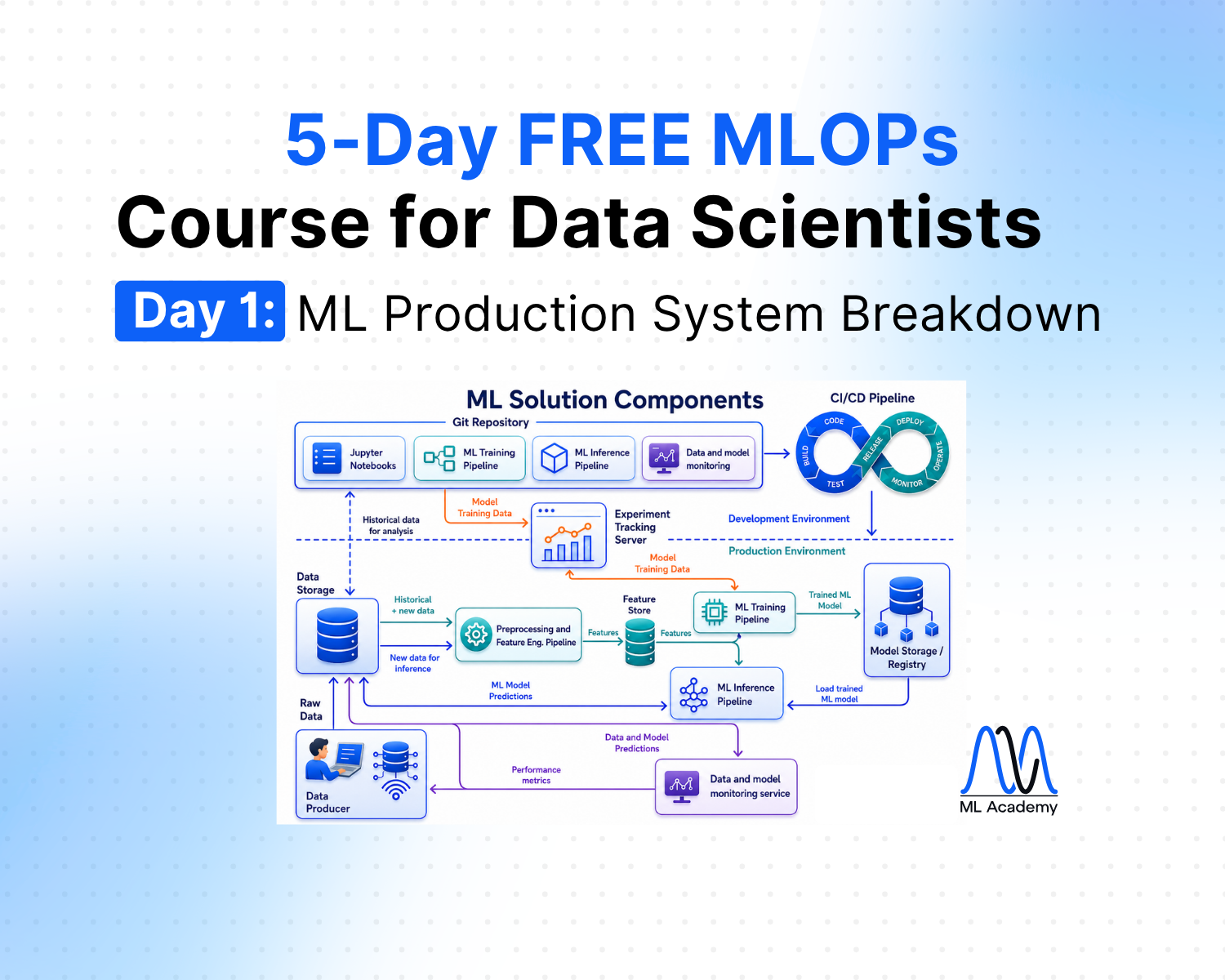
Welcome to Day 1 of our 5-day MLOps Course for Data Scientists.
If you're a Data Scientist, you already know the modeling part of the job. You can load data, run EDA, engineer features, train a model, tune it, and evaluate it. This work matters, no doubts about that.
But there's a much larger world around the model, which turns a trained model into something a business actually uses. And for many Data Scientists, that world is mostly invisible.
Not because they never see it, but because most courses, tutorials, and bootcamps stop at the model.
This week, we're going to fix that.
Over the next 5 days, you'll get the complete map of what a production ML system looks like, what each piece does, and how they fit together.
In 5 days, you'll think about ML projects the way MLOps engineers do.
You'll know exactly what to focus on to grow as a Data Scientist who builds ML systems, not just ML models.
We start today with the map itself: the 10 components of a production ML system.
Notebook ML model isn't the system
A trained model in a Jupyter notebook and a deployed ML system are two different things.
Notebooks usually contain experiments. You load some data, engineer some features, train a model, evaluate it, and get a number you're happy with.
But that's a small fraction of what's required to put that model in front of users or use it to make business decisions.
Just look at the figure below. There are tons of things that need to be done to make this model operate in a real-world business setup.
The actual Data Science work usually takes about 20% of the entire ML system building. The rest 80% is about MLOps.
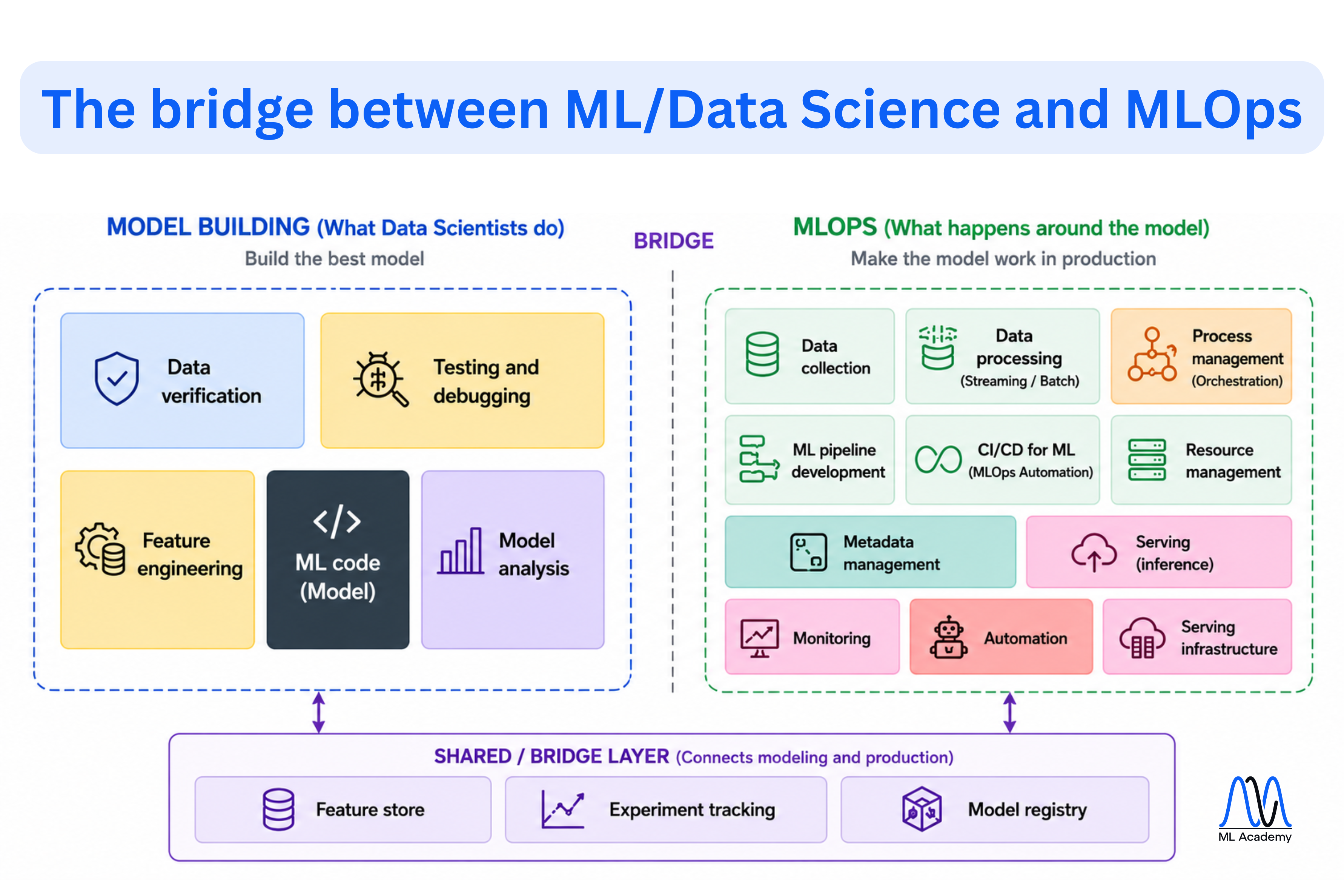
As you see, a production ML system is much more than model building.
Model building focuses on creating the best possible model: verifying data, engineering features, writing ML code, debugging experiments, and analyzing model performance.
But once a model is ready, a much larger set of capabilities is required to make it work reliably in production. The MLOps layer has to continuously:
- Collect fresh data from multiple sources.
- Process data in batch or streaming mode.
- Develop and run automated ML pipelines for training and inference.
- Compute and serve features consistently between training and production.
- Produce predictions on a schedule or in real time.
- Track experiments, model versions, and production deployments.
- Manage infrastructure, resources, metadata, and configurations.
- Monitor data quality, data drift, and model performance.
- Automate testing, deployment, retraining, and rollback through CI/CD.
- Recover quickly when any part of the system fails.
The model itself is only one component of a production ML system. Everything required to deploy, operate, monitor, and continuously improve that model in production is called MLOps.
The 10 components of a production ML system
Despite the ML solution architecture heavily depending on the business application, e.g., fraud detection or recommendation systems, we usually can distinguish 10 common components.
- Data Storage
- Data Processing (Streaming / Batch)
- Preprocessing & Feature Engineering Pipelines
- Training Pipeline
- Inference Pipeline
- Feature Store
- Model Registry
- Experiment Tracking
- Data & Model Monitoring
- CI/CD for ML (MLOps Automation)
Each system has its own purpose. This is described in more detail in the next section.
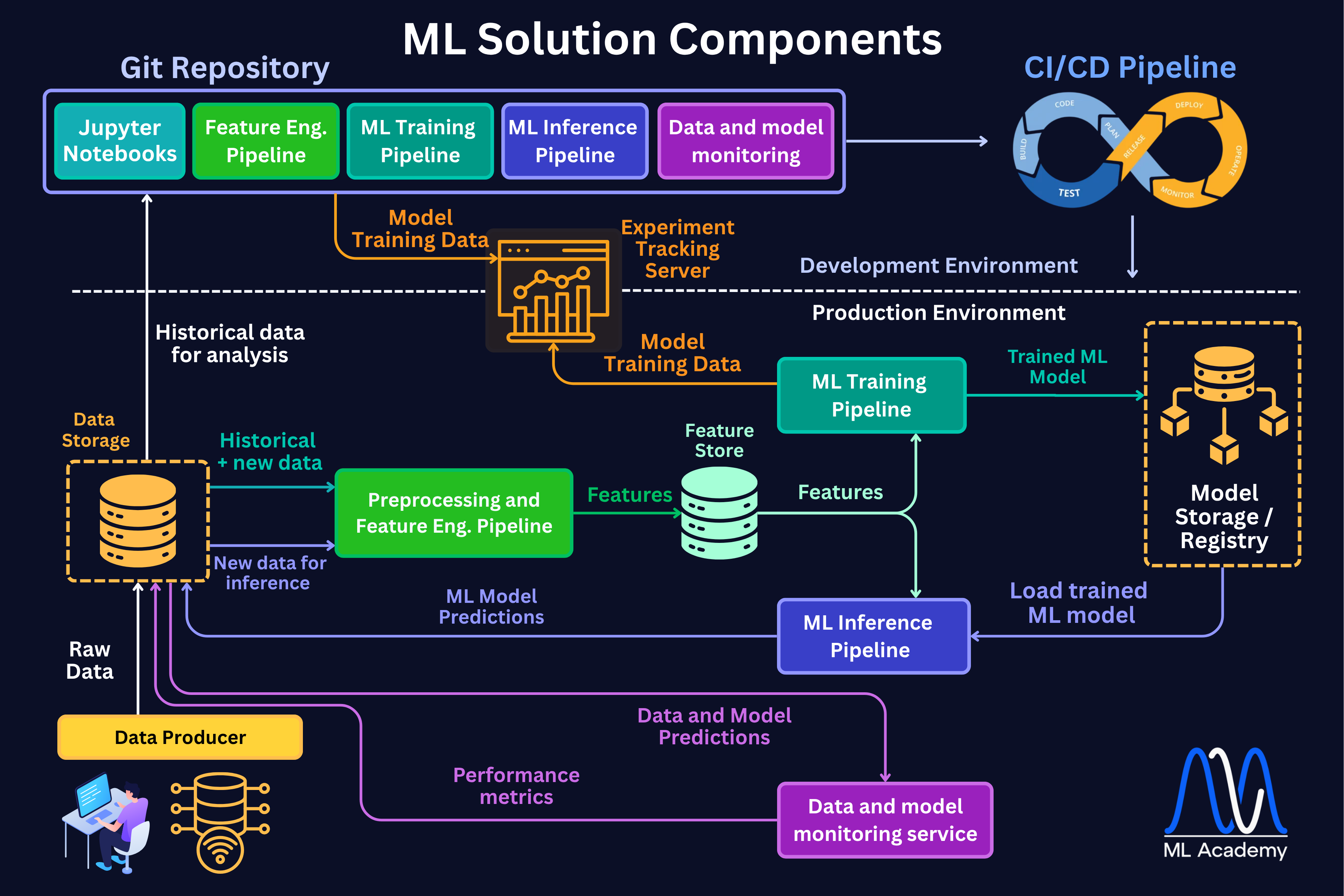
Before we dive into each component, let us see the general architecture of a typical ML Solution and how these components are connected.
1. Data Storage
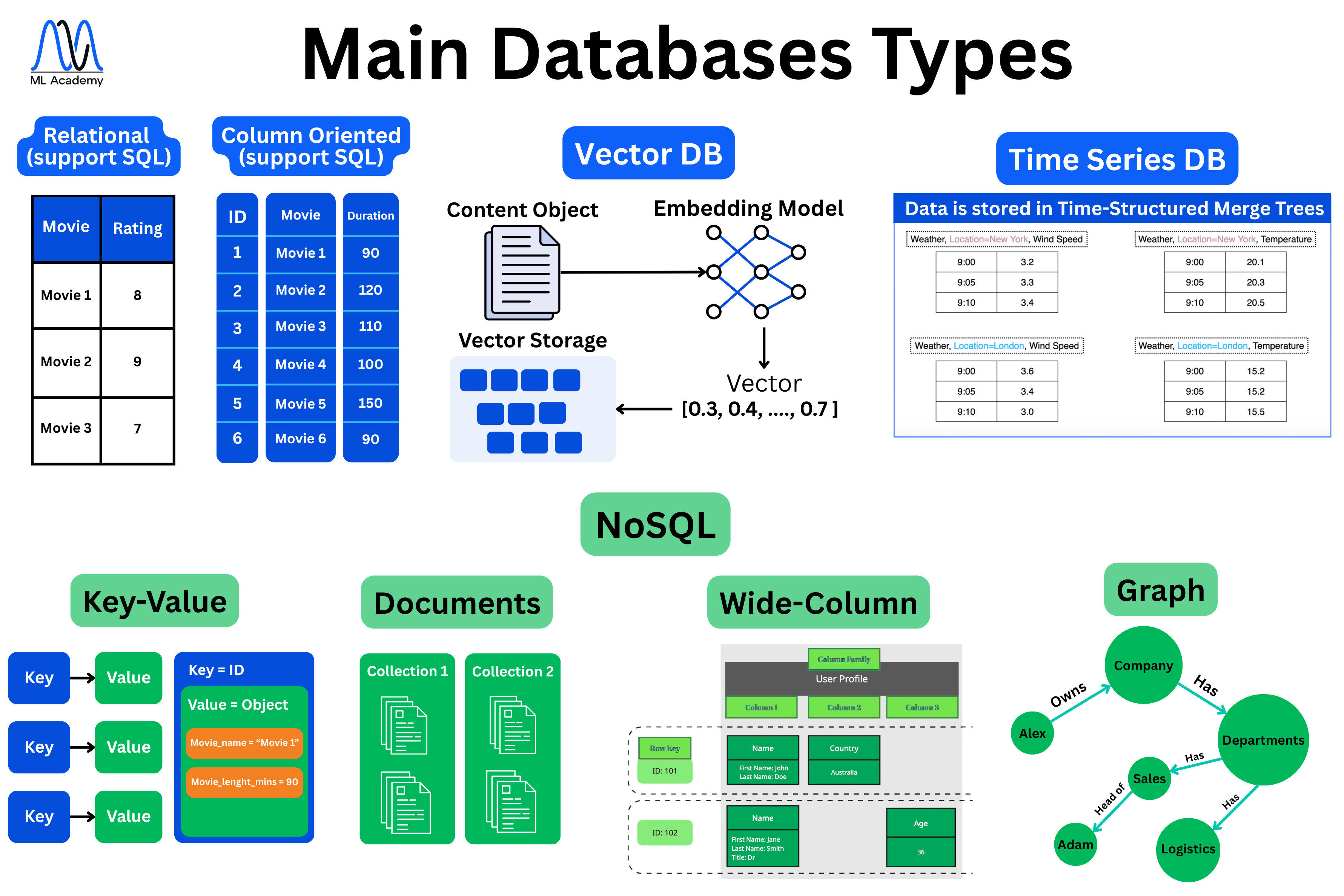
This is where everything starts. We cannot build any ML models without the data, which we need to properly store and process. We store data in databases.
There are many different database types, and the one you pick depends on your data type, for instance, tabular data, embeddings, time series, key-value pairs, or many other data types. Below, you can see various types of databases depending on the data type. We will talk about each database type in the next lesson.
2. Data Processing (Streaming / Batch)
Here, the data gets moved and prepared for everything downstream. There are two main modes: batch, where we collect data and process it in bulk on a schedule, and streaming, where we process it within milliseconds. Below, you can see the schematic overview of both system types.
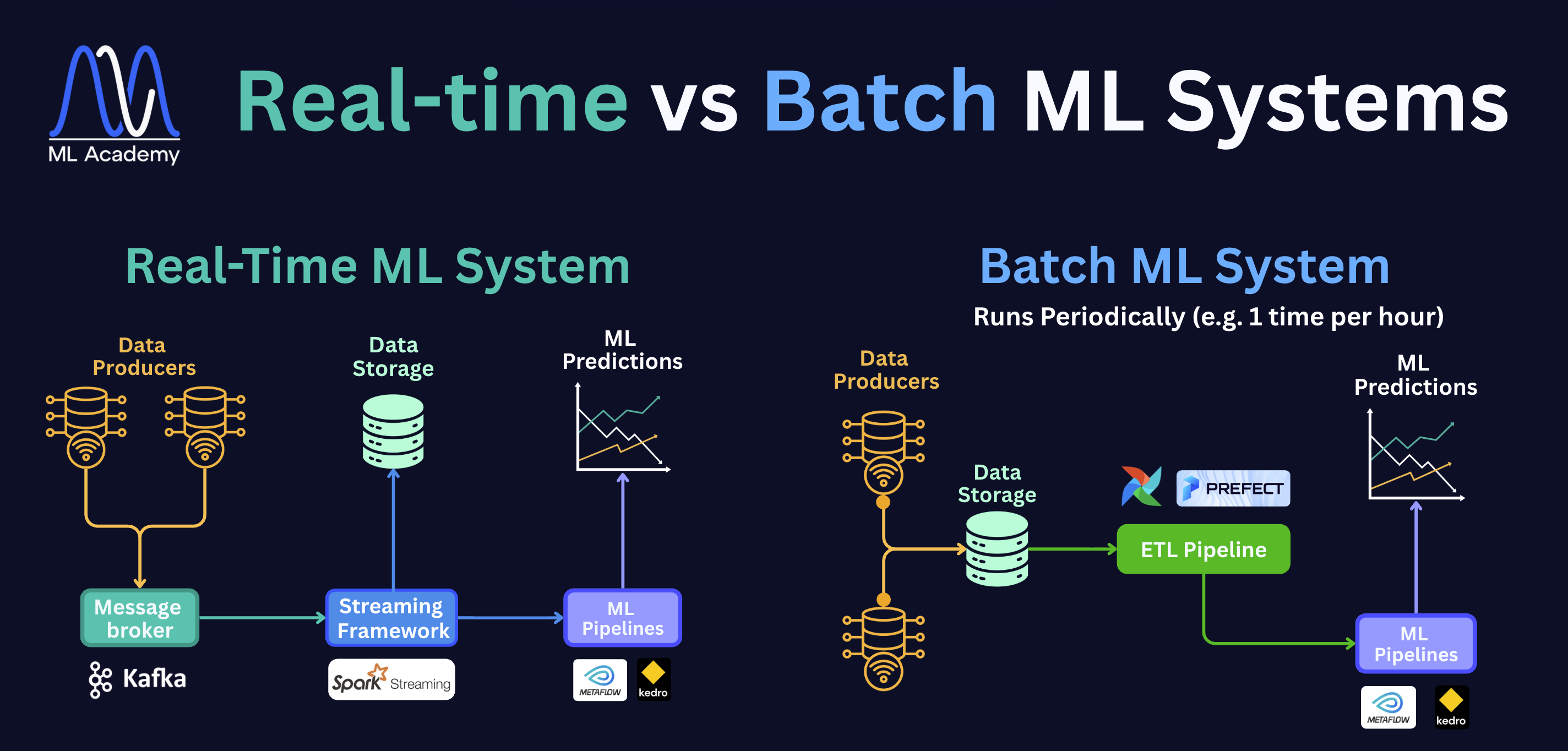
On the left is a Real-Time ML System. Data producers — sensors, apps, or services — send data into a message broker (Kafka), which acts as a buffer. A streaming framework like Spark Streaming picks it up immediately and passes it to the ML pipelines. The whole process happens within milliseconds.
On the right is a Batch ML System. Data from multiple producers lands in storage first. On a schedule, for example, once an hour, an ETL pipeline wakes up, pulls that accumulated data, transforms it, and hands it off to the ML pipelines. Nothing happens in between runs; the system simply waits for the next trigger.
The choice between the system types is driven entirely by how quickly the business needs results. For instance, in many demand forecasting systems, the training pipeline runs on a schedule and can afford to wait for a full batch of sales data to accumulate.
In a fraud detection system, the model has to evaluate a transaction before it completes, which means latency is measured in milliseconds, not hours.
Common tools for streaming include message brokers like Apache Kafka or Amazon Kinesis to move data, and stream processors like Apache Flink or Kafka Streams to transform it.
For batch, you'll typically see orchestrators like Apache Airflow or Prefect scheduling jobs, with Apache Spark handling the heavy distributed processing.
3. Preprocessing & Feature Engineering Pipelines
An ML pipeline is a sequence of steps that transforms data or performs some action, like training a model. Each step takes an input, does one thing, and passes the result to the next step. Instead of writing one large script that loads data, cleans it, engineers features, and trains a model all in one place, we break it into separate, well-defined stages. This makes the code modular, testable, and easy to run automatically on a schedule or on demand.
There are several types of ML pipelines in a production system. First, let’s consider the two that deal with data transformation: the Preprocessing Pipeline and the Feature Engineering Pipeline. Together, they are responsible for turning raw data into something a model can actually learn from.
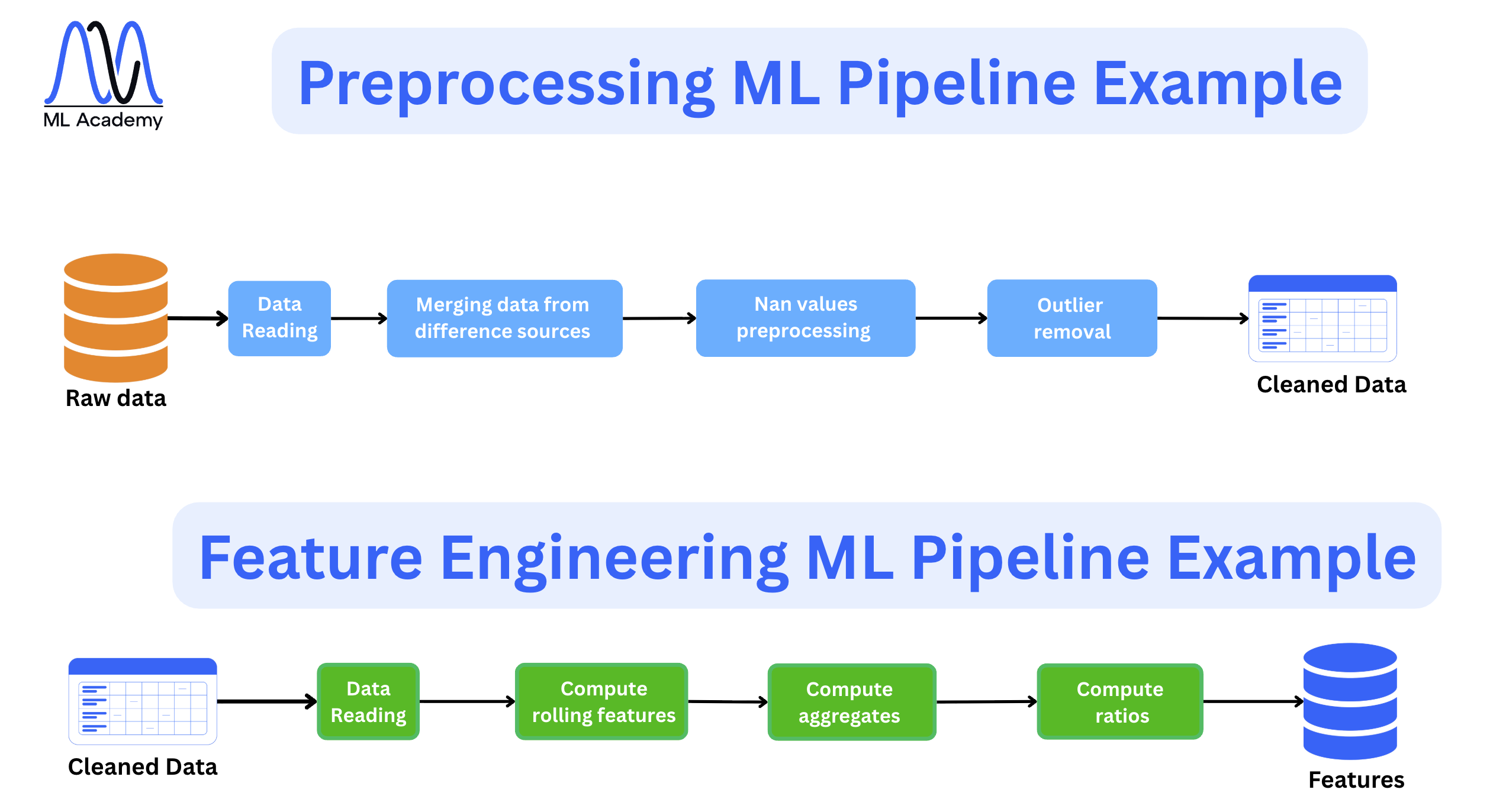
First, in the preprocessing step, we clean the data, which can include handling missing values, removing outliers, and many other data transformations depending on the data type and quality.
In the Feature Engineering pipeline, we then create the actual features the model learns from. For example, it can be rolling averages, extracting domain-specific attributes, or building more complex representations like text embeddings.
Usually, this is where raw data finally becomes something a model can use.
4. Training Pipeline
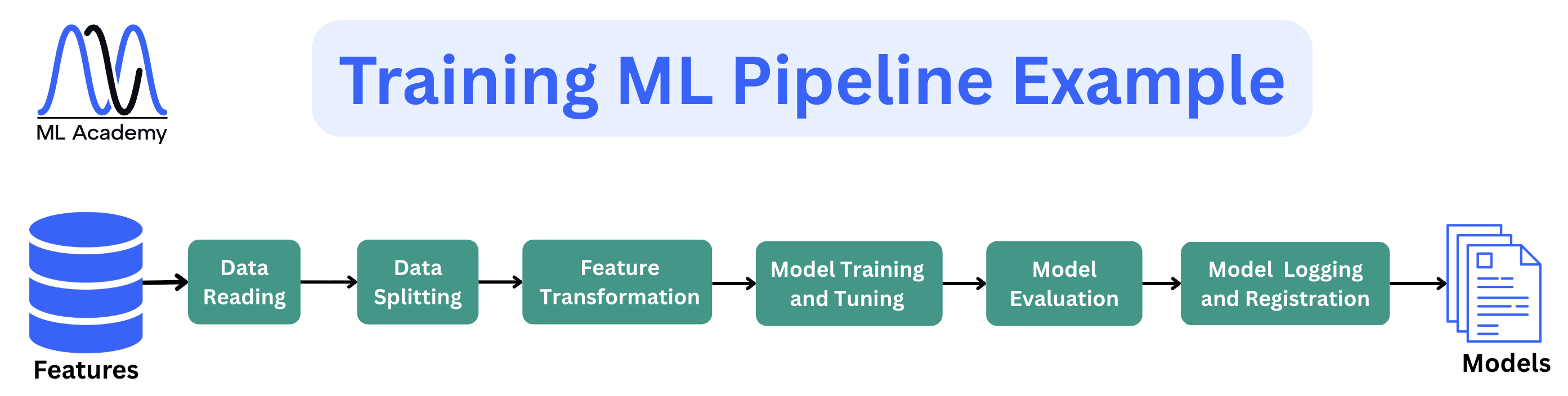
A training pipeline is a sequence of steps that takes features and produces a trained, evaluated, and registered model. Here, we take the computed features and produce a trained, evaluated, and registered model. The keyword here is automated, which means the pipeline runs the same way every time, on a schedule or on a demand basis. This is the part most Data Scientists already know well.
The steps are usually the same across most systems: load features from storage or a Feature Store, split the data, train the model, tune hyperparameters, evaluate performance, and save the result — the model artifact along with its metrics and parameters — to a Model Registry.
5. Inference Pipeline
An inference pipeline is a sequence of steps that takes new data and produces predictions. This is where the model makes predictions on the newly available data. Here’s an example of an Inference ML Pipeline.
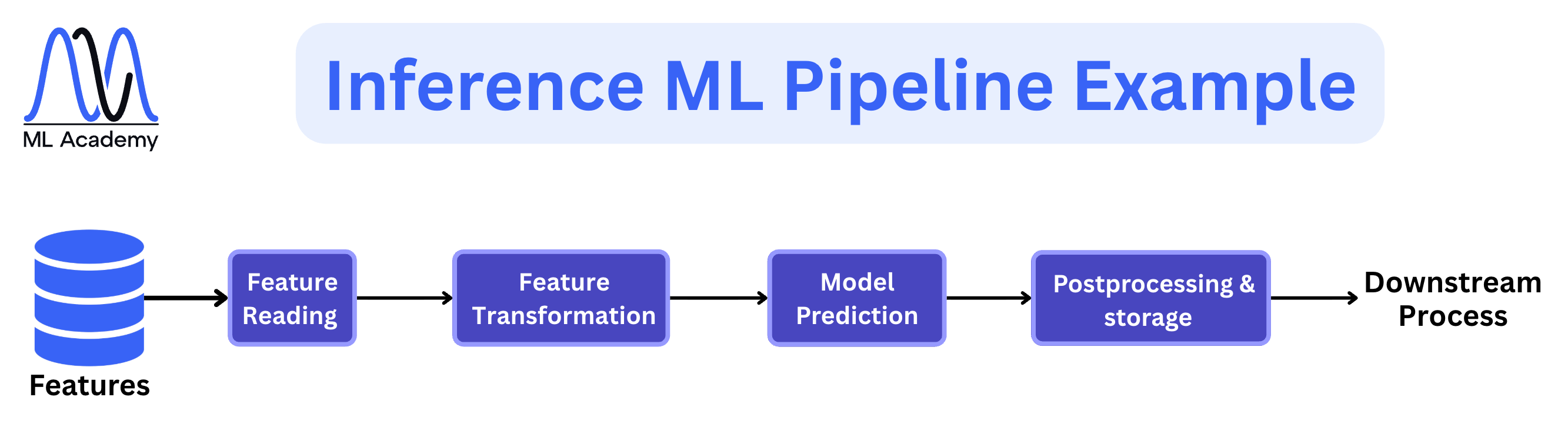
There are two main types: batch, where we score a whole dataset on a schedule, like nightly churn scoring, and real-time, where we serve predictions instantly via an API, like ranking videos the moment a user opens the app. Note that this is connected to the way the data is processed, which we discussed above.
The steps are similar in both cases. We load new data, run it through the same feature transformations used at training time, load the current model from the Model Registry, generate predictions, and apply any post-processing logic such as thresholds, business rules, or anomaly checks. The output goes to storage, a downstream application, or both.
The real-time variant places much tighter constraints on the system. In fraud detection, for example, the model has to return a decision before the transaction completes, with latency measured in milliseconds. That single requirement shapes every architectural decision, like how features are stored, how the model is served, and what infrastructure sits underneath it.
6. Feature Store
Here, we manage features in one central place, so the model sees the same features in training and in serving. Usually, it splits into two parts: an offline store that holds the full history (for training) and an online store that holds the latest values (for fast serving).
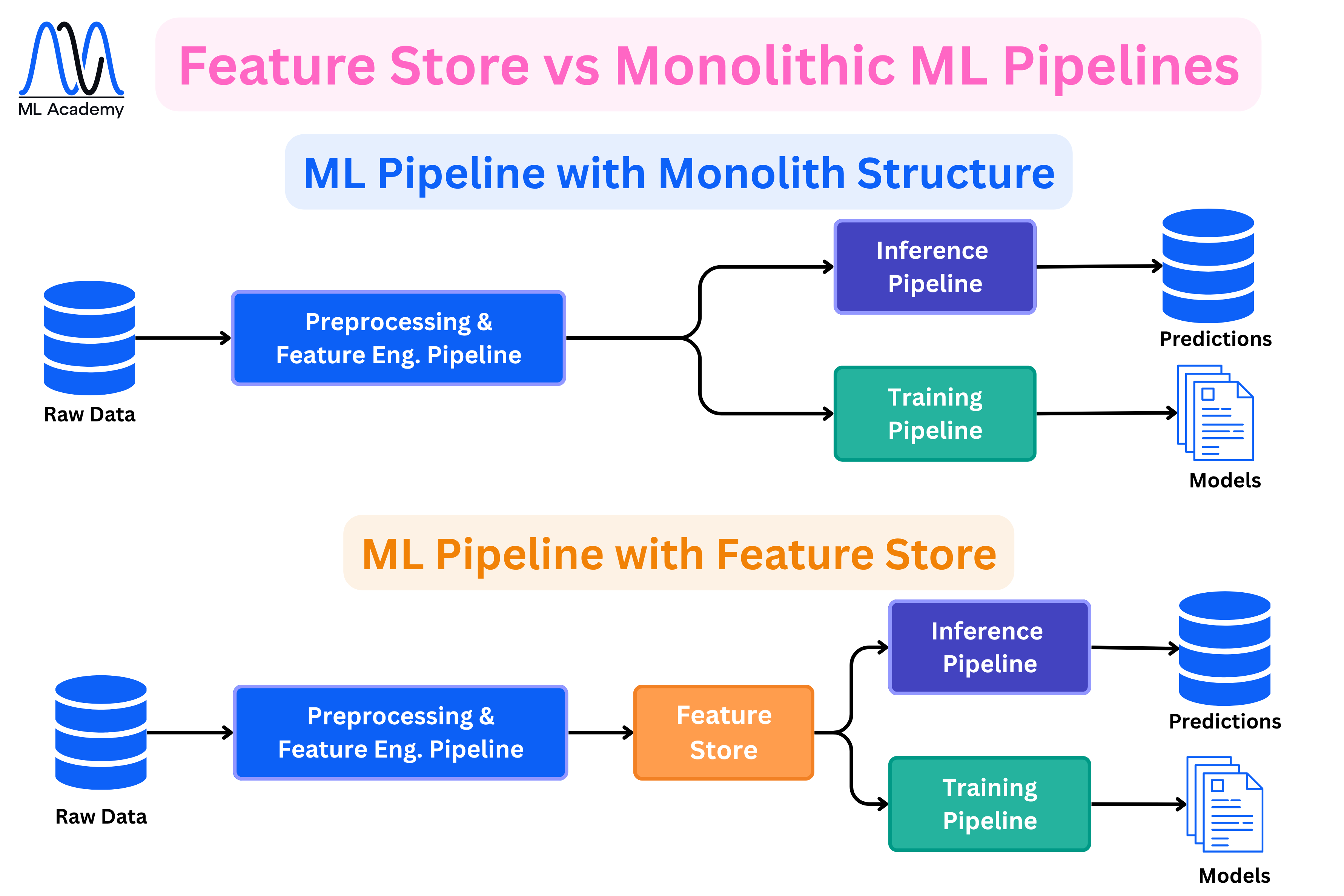
Here, we manage features in one central place, so the model sees the same features in training and in serving. Usually, it splits into two parts: an offline store that holds the full history (for training) and an online store that holds the latest values (for fast serving).
The diagram above shows why this matters. In a monolithic setup, the Preprocessing and Feature Engineering Pipeline feeds directly into both the Training and Inference pipelines. That means feature logic is either duplicated or shared in ways that are easy to break. If someone updates the feature computation in one place but not the other, the model trains on different features than it scores on. This is called training-serving skew, and it's one of the most common sources of silent model degradation in production.
With a Feature Store in the middle, both pipelines read from the same place. The features are computed once, stored, and served consistently to both training and inference. That single change removes an entire class of bugs.
Not every system needs a Feature Store though. For a straightforward batch system, well-structured pipelines and versioned datasets are often enough. It becomes worth the added complexity when features need to be served in real time with low latency, when multiple models share the same feature definitions, or when you need strict control over what inputs the model is seeing in production.
7. Experiment Tracking
Experiment Tracking is the process of recording, organizing, and comparing different model training runs. In practice, finding a good model means running many experiments, such as trying different algorithms, hyperparameters, feature sets, and data splits. Without a system to track all of that, it becomes very hard to know which run produced which result, or to reproduce a model that performed well three weeks ago.
For each run, we log things like the hyperparameters used, the metrics produced, the version of the code, and the model artifact itself. This gives us a full record of every experiment, so we can compare runs side by side and confidently pick the best candidate for production.
Let's also discuss how ML experiment Tracking helps for team collaboration. Let's look at the figure below.
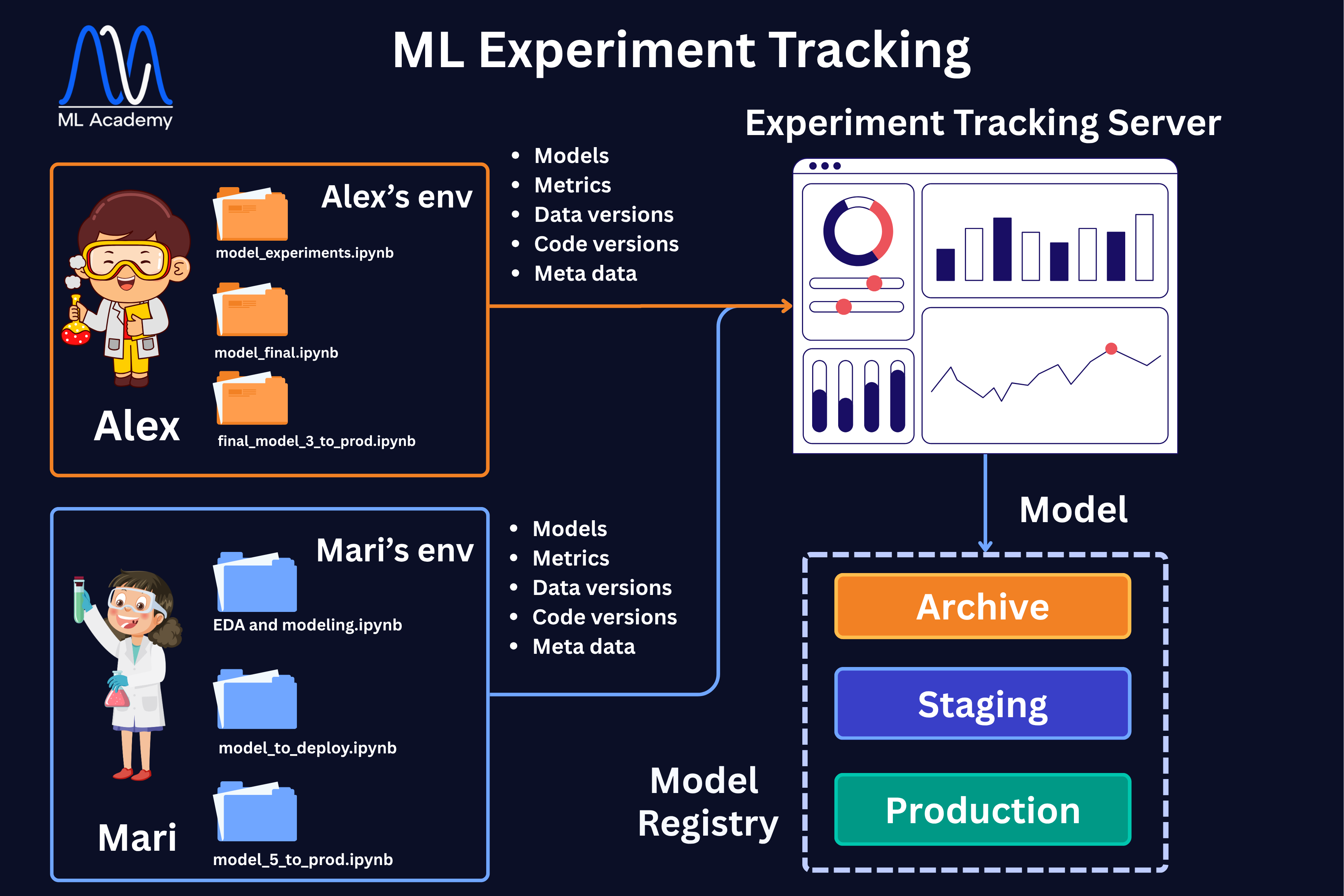
When multiple people are running experiments in parallel, like Alex and Mari in the diagram above, each working in their own environment, the tracking server becomes the single shared place where all results land. Instead of comparing notebooks manually, everyone can look at the same dashboard and see exactly what was tried and what worked.
That is why in the overall architecture diagram, the Experiment Tracking server sits in the middle, connecting the development environment where Data Scientists run experiments, and the production environment where the best model ends up. Once a run produces a model worth promoting, it moves from the tracking server into the Model Registry, where it gets assigned a lifecycle stage like Staging or Production.
8. Model Registry
A Model Registry is a centralized system for managing the full lifecycle of ML models. Once a model is trained and tracked, it needs to go somewhere, and that somewhere is the registry. It stores every trained model as a versioned artifact along with all the metadata that came with it, like hyperparameters, evaluation metrics, and the code version it was trained from.
A newly trained model starts in Staging, where it gets tested in a production-like environment before serving any real traffic. Once it passes those checks, it gets promoted to Production, which is the active model serving real traffic. Older models that are no longer in use move to the Archive, where they are kept for traceability and auditing.
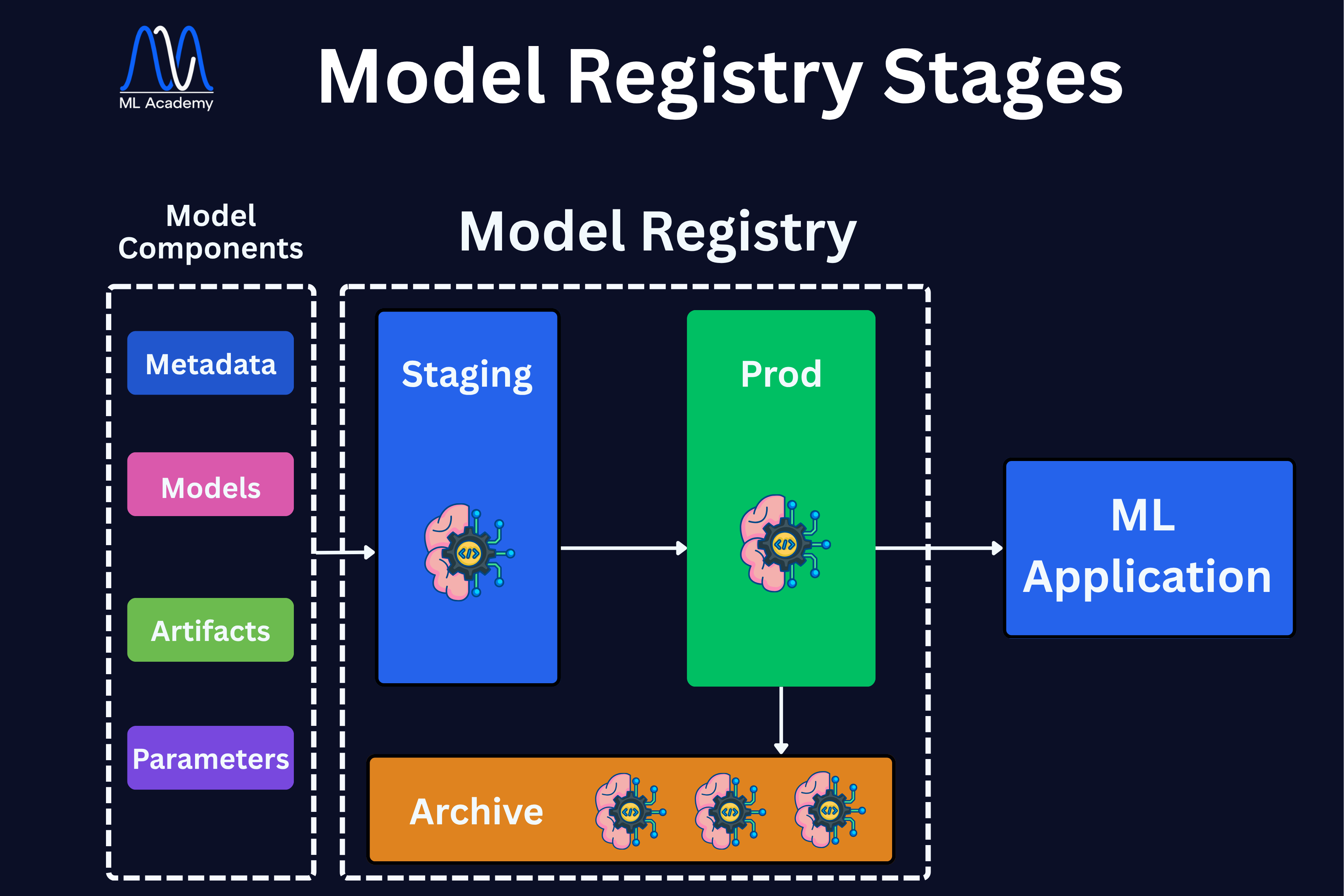
This structure gives teams a clear, governed path from experiment to deployment. Instead of manually copying model files or tracking versions in spreadsheets, the registry handles all of that. And if a new model underperforms in production, rolling back to the previous version is straightforward because everything is versioned and stored in one place.
9. Data & Model Monitoring
Deploying a model is not the end of the project, it is actually the start of its most critical phase. In production, the conditions the model was trained under rarely stay stable. Customer behavior evolves, sensors change, seasonality kicks in, markets shift. The model that worked yesterday quietly stops working today, and without monitoring, no one notices until a business metric degrades.
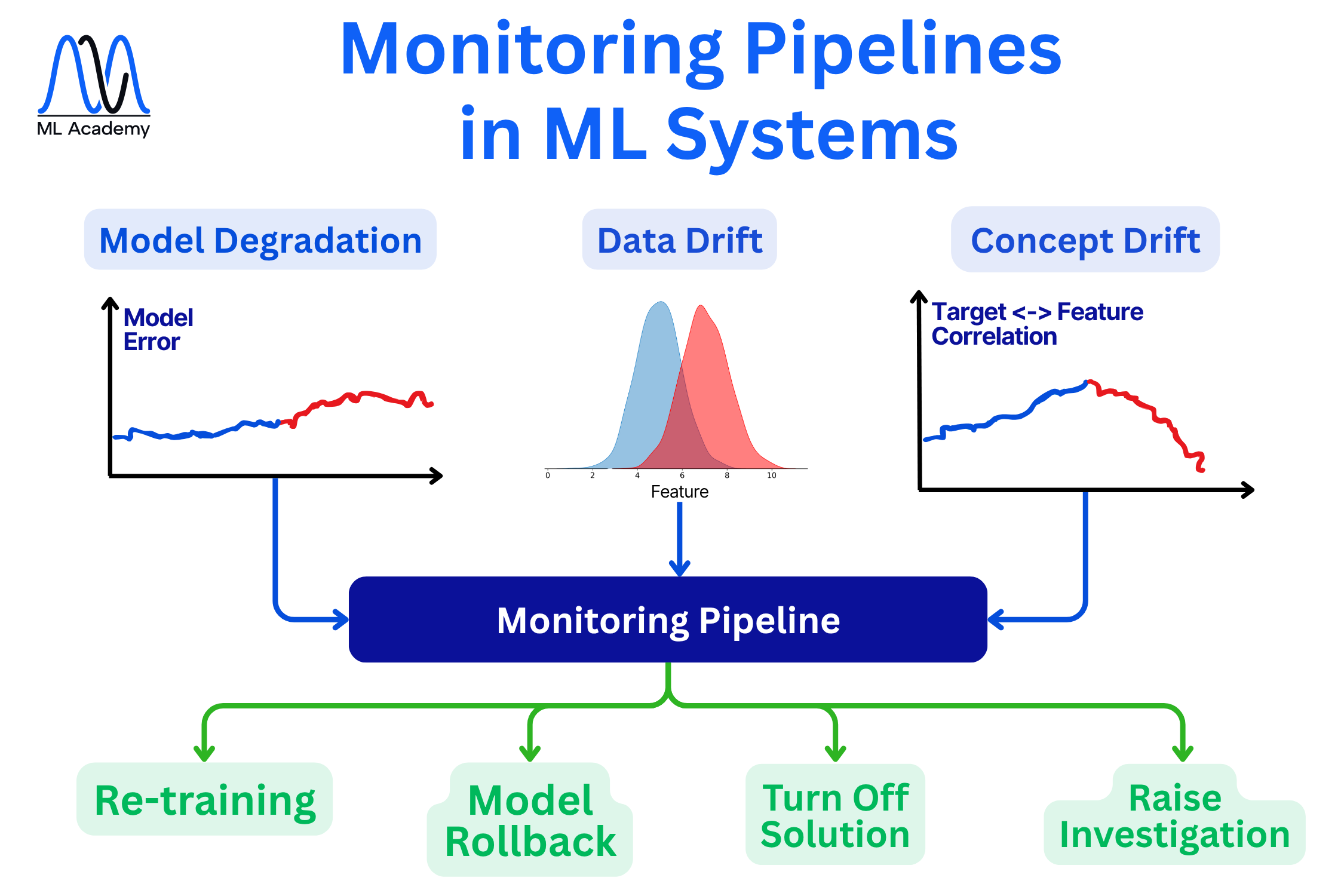
There are three main scenarios to watch, as we can see from the figure below.
Model Degradation, where model error is tracked over time, and an increasing error means the model is getting worse, whatever the cause.
Data Drift, where the distribution of input features shifts away from what the model was trained on.
Concept Drift, where the relationship between features and the target changes — the inputs can look fine while the link between input and outcome quietly breaks.
We will consider each case in one of the next lessons.
10. CI/CD for ML (MLOps Automation)
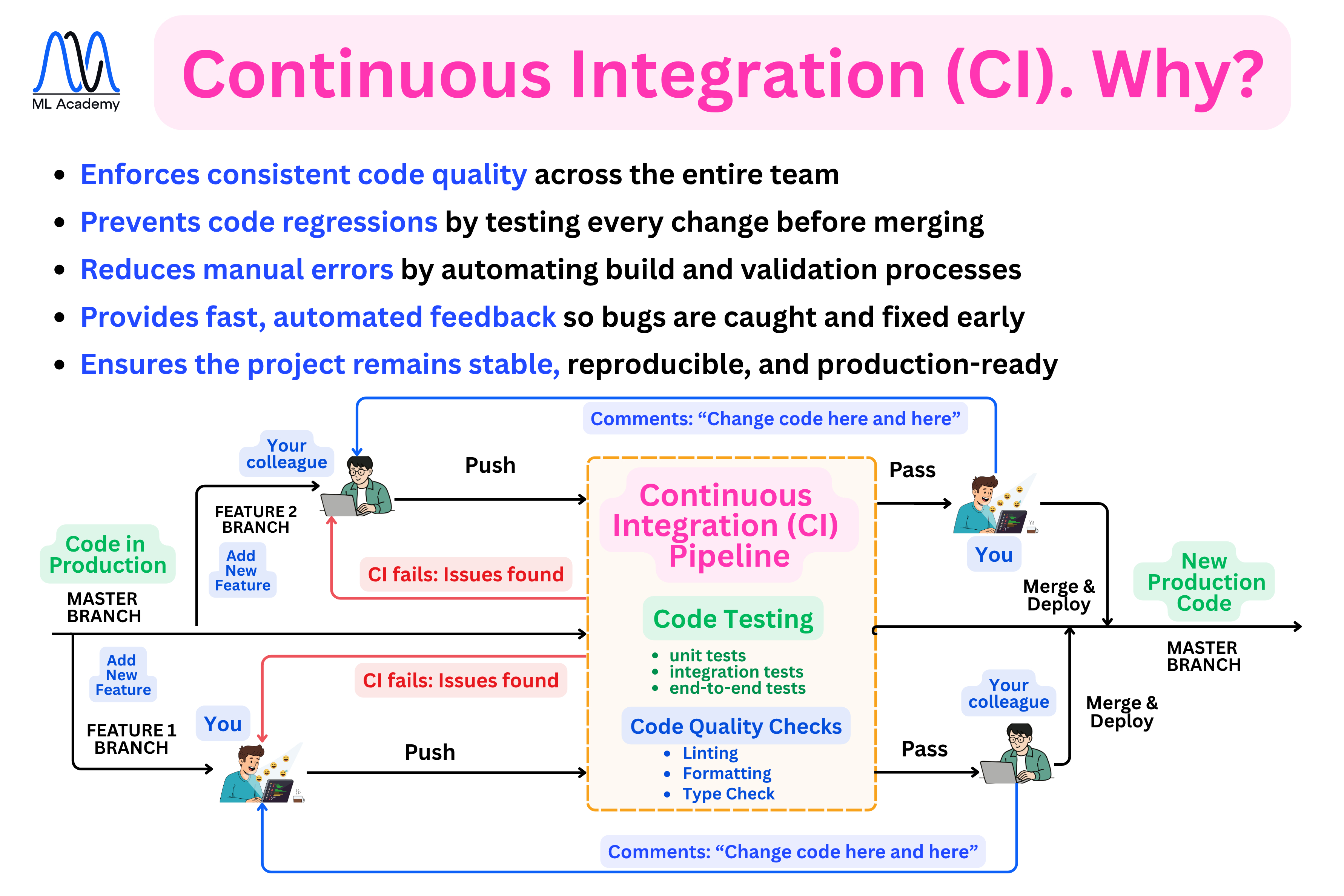
The CI/CD Pipeline is what helps us to deploy our ML System in production quickly and safely, instead of by hand. It's different from regular software CI/CD because here, we're testing and deploying data-dependent artifacts, not just code.
Here's an overview of why to use a CI pipeline in ML systems. We will discuss this in-depth in one of the next lessons.
What's next
In the next lesson, we will learn about Databases and Data Processing in Production ML Systems.
Related Articles
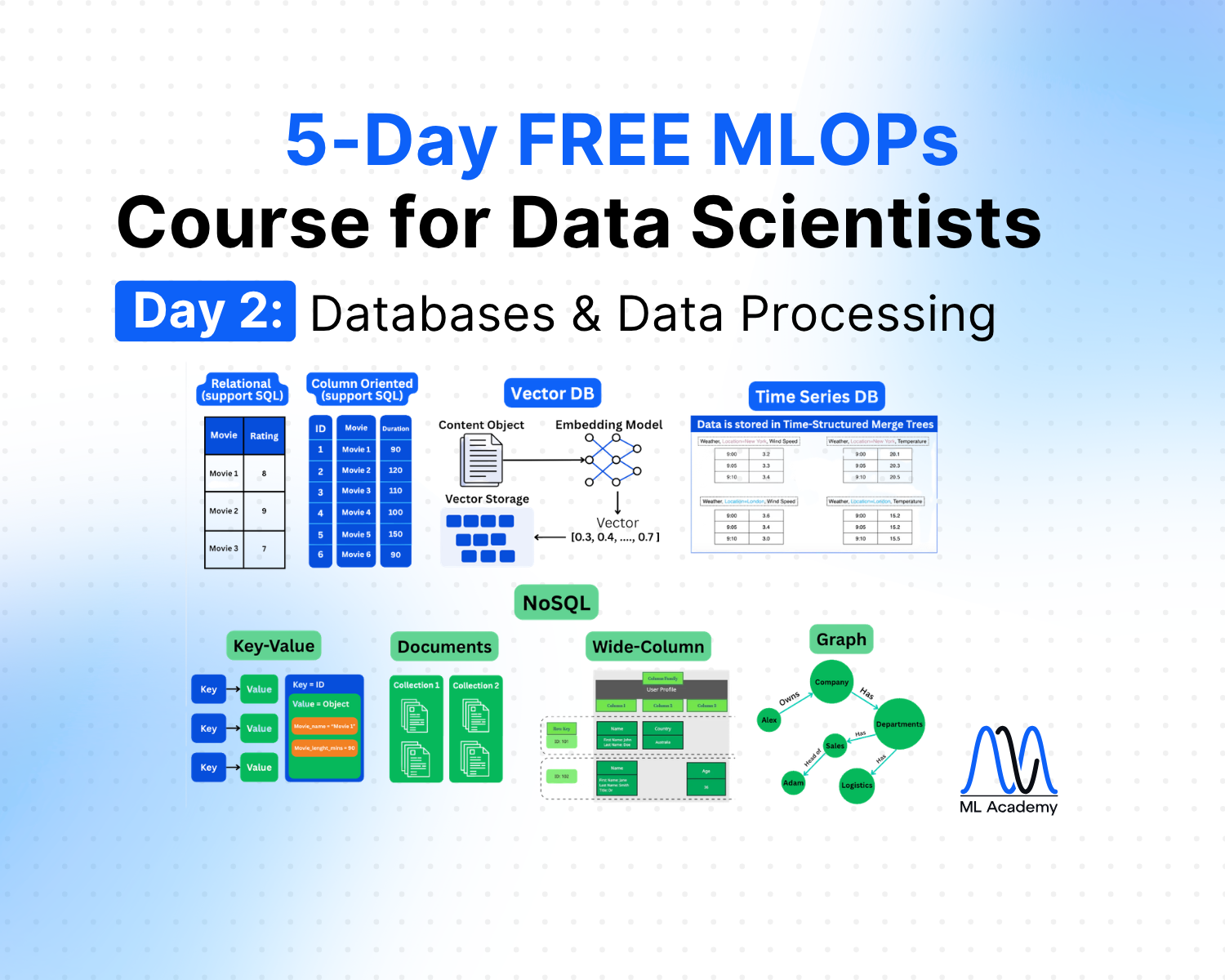

Free MLOps Course for Data Scientists: Day 2 - Databases and Data Processing
A five-part guide to data storage and processing for production ML systems: relational, column-oriented, vector, and key-value databases, plus streaming and batch processing explained for Data Scientists.
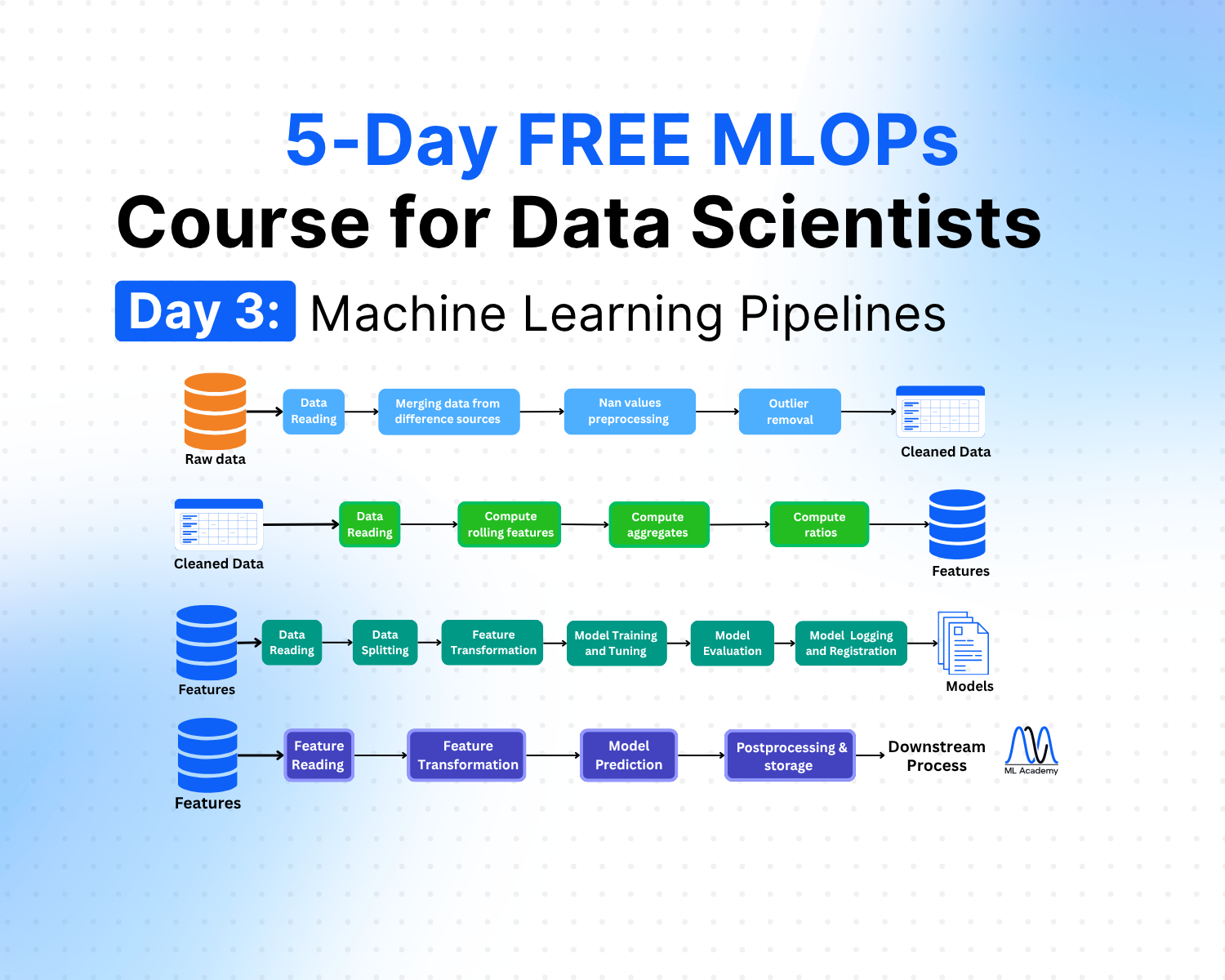
Free MLOps Course for Data Scientists: Day 3 - Machine Learning Pipelines
A practical guide to ML pipelines for Data Scientists: preprocessing, feature engineering, training, and inference pipelines explained with Python code examples and implementation best practices.
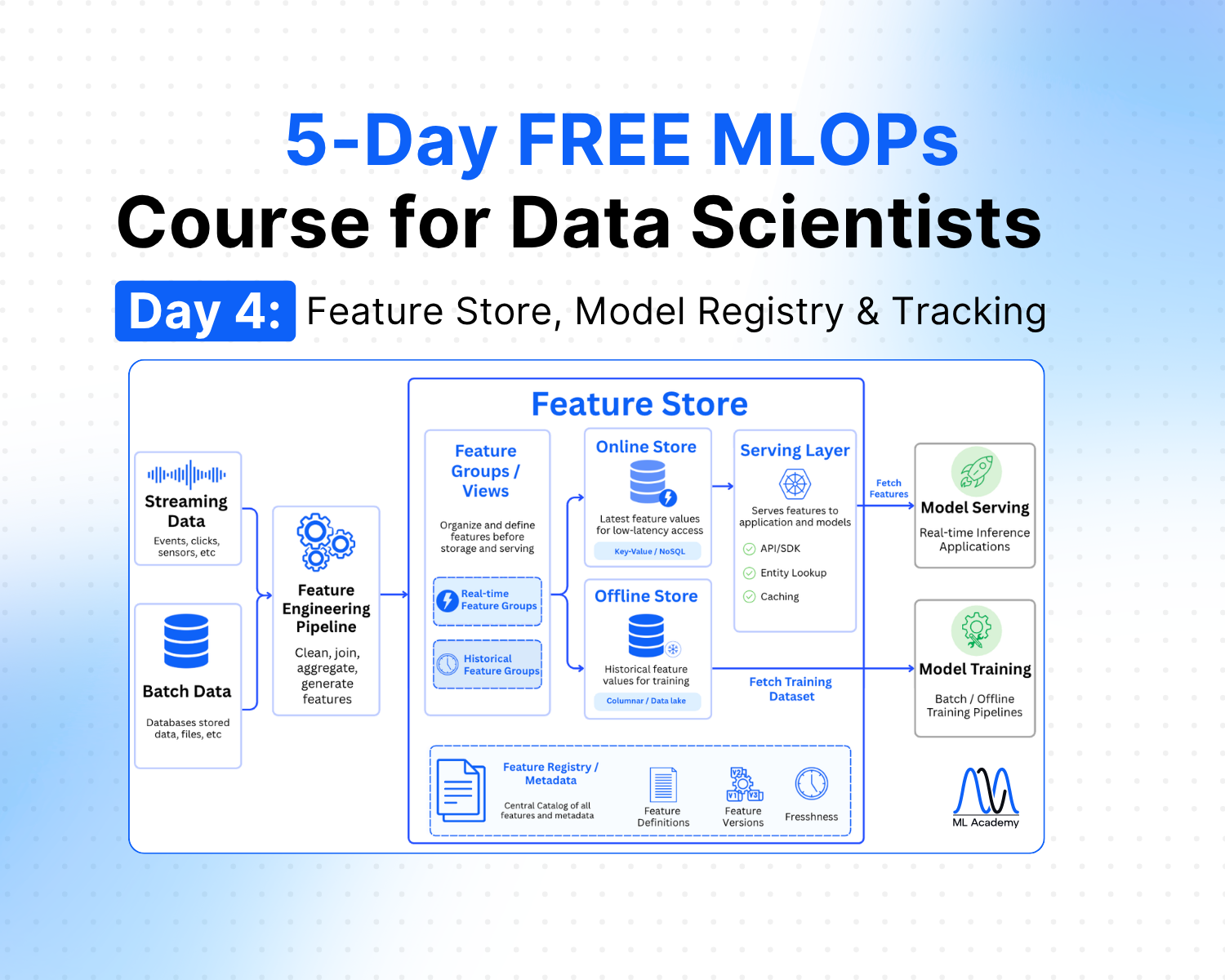
Free MLOps Course for Data Scientists: Day 4 - Feature Store, Model Registry and Experiment Tracking
A practical guide to feature stores, experiment tracking, and model registry for Data Scientists: what each component does, when to use them, and how they connect in a production ML system.
Ready to transform your ML career?
Join ML Academy and access free ML Courses, weekly hands-on guides & ML Community