.webp)
Machine Learning Project Template
Complete Template of Real-World ML Project Structure


Machine Learning Project Structure - Introduction
The repo with the Project Structure Template is HERE
Let me share a story that I've heard too many times from ML practitioners.
"Doing analysis in a Notebook is clear. But what to do next? Seems like I need to organize my code, but there are so many ways to do that. I'm not a Software Engineer. What I usually do is that I have 1-2 folders and split the files between them. Well... it works! Until my project grows"
Sound familiar?
The truth is, when you develop ML models professionally, having a well-structured project isn't just nice-to-have—it's essential for team collaboration, reproducibility, maintainability, and production readiness.
Yet most data scientists and ML engineers learn project structure through trial and error, often after painful experiences with messy codebases.
This comprehensive guide will show you exactly how to structure your ML projects like a pro, based on patterns that have proven successful across hundreds of real-world projects.
What is ML Project Structure?
ML project structure is the organized layout of files, folders, and code that make up your machine learning project. It's like a blueprint of your ML codebase—it defines where everything lives and how different components interact with each other.
Unlike traditional software projects, ML projects have unique requirements that make structure even more critical. You're dealing with multiple data versions, experimental code that needs to become production-ready, model artifacts that must be versioned, and complex pipelines that transform raw data into actionable insights. Without proper structure, these complexities quickly spiral out of control.
A well-structured ML project has clear separation of concerns: data lives in designated folders, code is modular and reusable, configurations are externalized, models are versioned and tracked, and documentation explains how everything works together. The goal is simple yet profound: anyone (including future you) should be able to understand, run, and modify your project without hunting through a maze of scattered files.
The best ML project structures follow principles borrowed from software engineering—modularity, separation of concerns, and single responsibility. But it must be adapted for the unique challenges of machine learning workflows. This means treating your ML code with the same rigor you'd apply to any production software system.
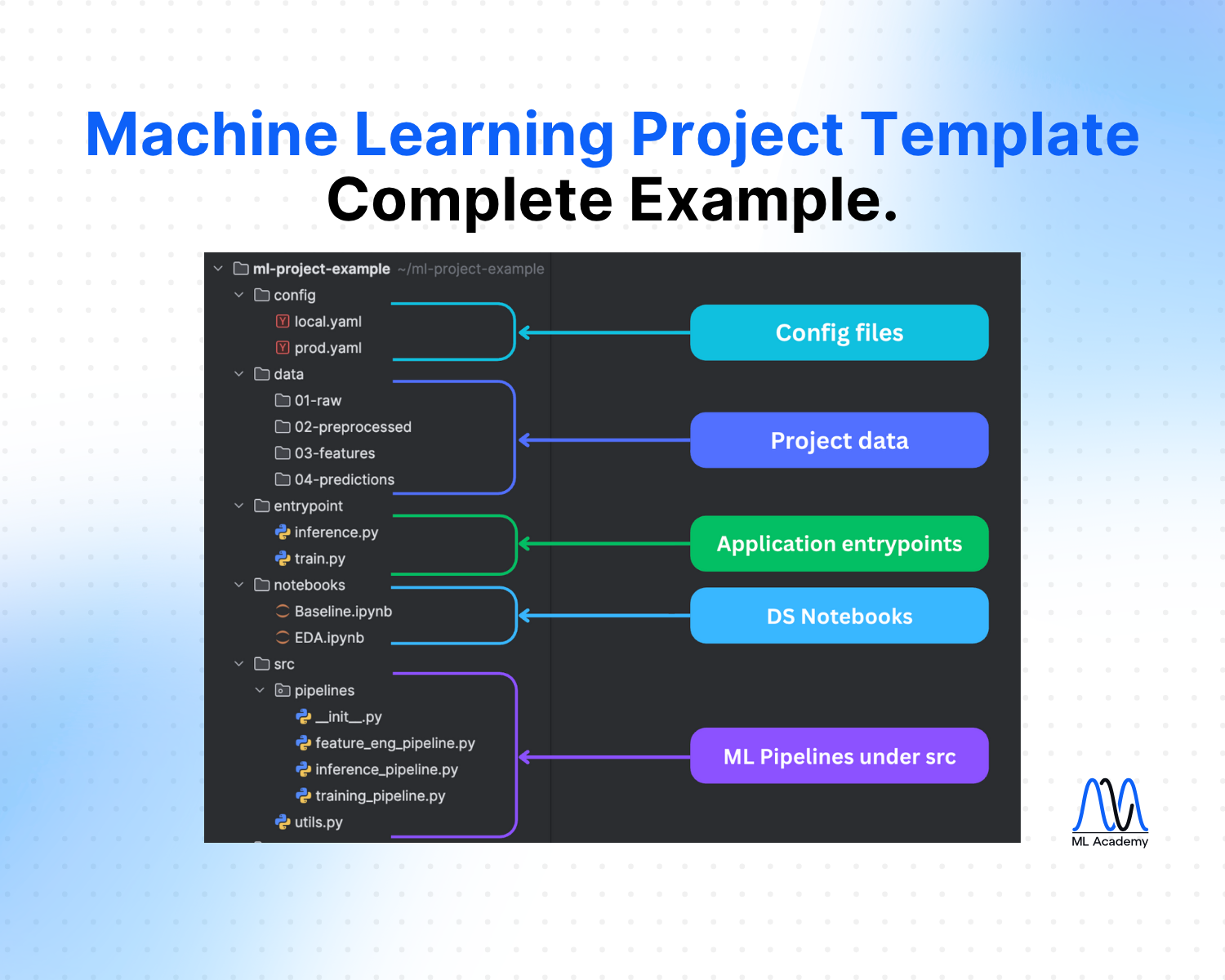
Here's a Machine Learning Project Structure that I'm following after completing 10+ industrial-level projects. In the next section, we will go through them one by one in detail.
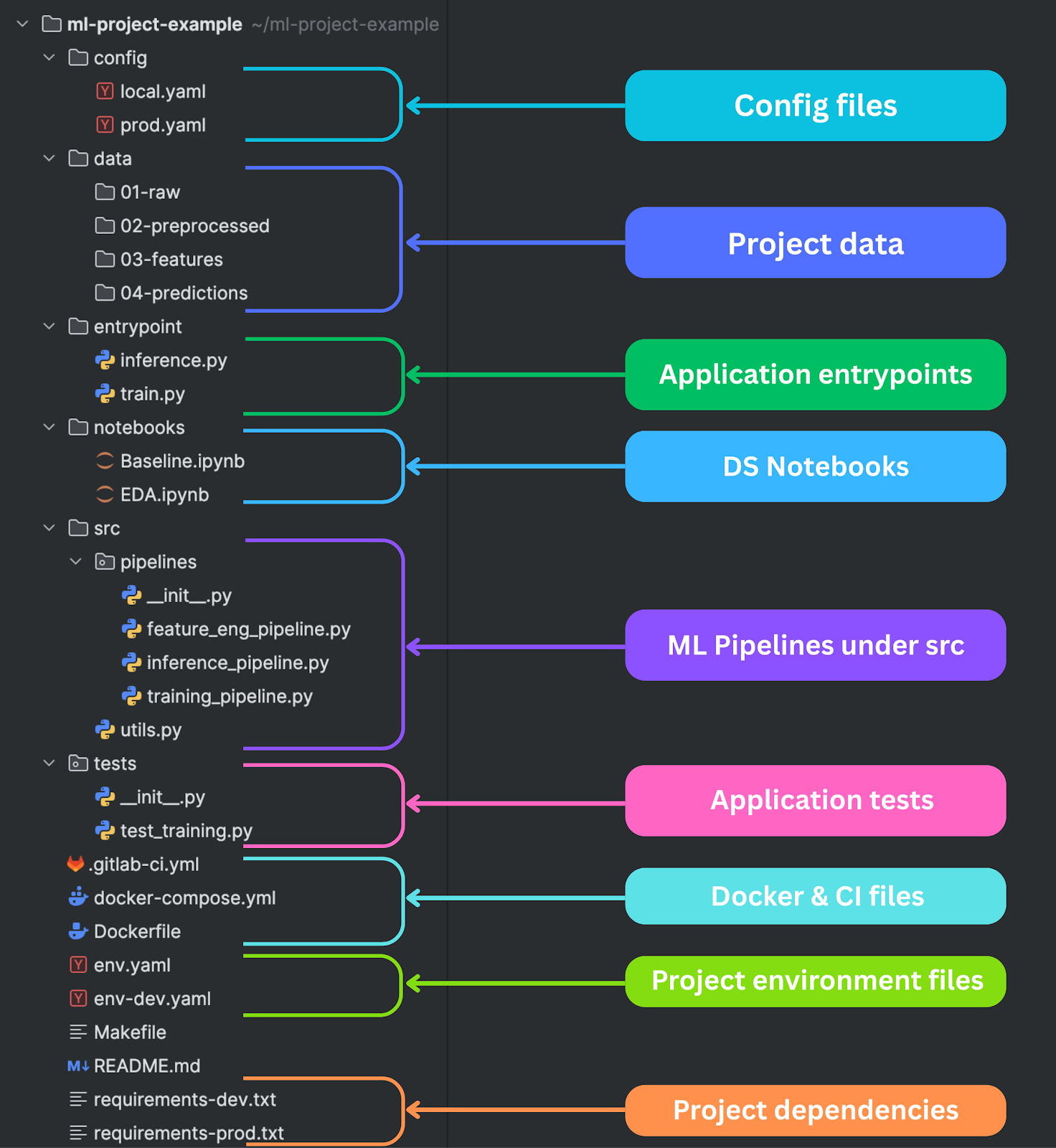
config/ - Configuration Files
Configuration files are the foundation of maintainable ML projects. They separate your parameters from your code, making it possible to run the same codebase with different settings for different environments, experiments, or deployment scenarios.
The config/ directory should contain environment-specific configuration files.
local.yaml contains settings optimized for local development—smaller datasets, fewer epochs, simpler models that train quickly on laptop hardware.
prod.yaml contains production settings—full datasets, optimized hyperparameters, and configurations that prioritize accuracy over development speed.
Configuration management goes beyond just hyperparameters. Your config files should specify data paths, model architectures, training procedures, evaluation metrics, and deployment settings. This makes your entire ML pipeline configurable without code changes, which is essential for experimentation and A/B testing.
The example below shows what a configuration file might look like.
data:
  raw_data_path: "data/01-raw/customer_data.csv"
  train_path: "data/02-preprocessed/train.csv"
  test_path: "data/02-preprocessed/test.csv"
  validation_split: 0.2
  target_column: "churn"

preprocessing:
  handle_missing: "median"  # median, mean, drop
  categorical_encoding: "onehot"  # onehot, label, target
  numerical_scaling: "standard"  # standard, minmax, robust
  feature_selection:
    method: "correlation"
    threshold: 0.8

model:
  type: "RandomForest"
  parameters:
    n_estimators: 100
    max_depth: 10
    min_samples_split: 5
    min_samples_leaf: 2
    random_state: 42
Modern ML projects often need multiple configuration strategies. You might have different configs for different data sources, model types, or business use cases. Some teams use configuration inheritance, where a base config contains common settings and environment-specific configs override only what's different. Others prefer explicit configs for each scenario to avoid hidden dependencies.
The key principle is that no parameters should be hardcoded in your source code. Everything that might need to change—file paths, model parameters, processing options—should be externalized to configuration files. This makes your code more flexible and your experiments more reproducible.
data/ - Data Storage with Clear Pipeline Stages
The data directory structure makes your data processing pipeline visible and understandable. The numbered prefixes (01-, 02-, etc.) create a clear flow from raw data to final predictions, making it impossible to misunderstand the processing sequence.
01-raw/ contains original, unmodified data exactly as received from source systems. This data should be treated as immutable—you never modify files in this directory. Instead, you create processed versions in subsequent stages. This immutability is crucial for debugging and reproducibility. When something goes wrong downstream, you can always trace back to the original data.
02-preprocessed/ contains data that has been cleaned and standardized, but not yet feature-engineered. This might include missing value imputation, outlier removal, data type conversions, and basic normalization. The key insight is that preprocessing and feature engineering are different concerns and should be separated.
03-features/ contains the final feature matrices ready for model training. This includes all feature engineering, encoding, scaling, and selection. Having this as a separate stage allows you to experiment with different models on the same features without re-running the entire feature engineering pipeline.
04-predictions/ stores model outputs, predictions, and evaluation results. This creates a clear audit trail of what your models predicted and when. It also enables offline evaluation and comparison between different model versions.
This staged approach to data management prevents common issues like data leakage, makes debugging much easier, and enables efficient pipeline optimization. You can cache expensive computations at each stage and only re-run what's necessary when upstream changes occur.
entrypoint/ - Application Entry Points
Entry point scripts are the public interface to your ML system. They should be simple, focused, and provide clear command-line interfaces for training models and making predictions. These scripts orchestrate your ML pipelines but don't contain business logic themselves.
train.py should handle the complete model training workflow—data loading, preprocessing, feature engineering, model training, evaluation, and artifact saving. It should accept configuration files as arguments and provide clear feedback about training progress and results.
inference.py handles prediction workflows. This might include batch prediction on large datasets, real-time inference APIs, or interactive prediction interfaces.
Entry points should also handle environment setup, logging configuration, and resource management. They're responsible for setting up the runtime environment that your ML pipelines need to execute successfully.
Here's an example of a training pipeline entrypoint.
import argparse
import sys
from pathlib import Path

sys.path.append(str(Path(__file__).parent.parent / "src"))

from pipelines.training_pipeline import TrainingPipeline


def main():
    parser = argparse.ArgumentParser(description="Train ML model")
    parser.add_argument("--config", required=True, help="Path to config YAML")
    args = parser.parse_args()

    try:
        pipeline = TrainingPipeline(args.config)
        results = pipeline.run()
        print(f"Training completed! Accuracy: {results['accuracy']:.4f}")

    except Exception as e:
        print(f"Training failed: {e}")
        sys.exit(1)


if __name__ == "__main__":
    main()
notebooks/ - Exploratory Analysis and Prototyping
Notebooks serve a specific purpose in the ML workflow: exploration, prototyping, and communication. They're perfect for understanding your data, trying new approaches, and sharing insights with stakeholders. However, they should never contain production logic or be part of your deployment pipeline.
The key principle is that notebooks are ephemeral. They're great for answering specific questions or exploring new ideas, but the valuable insights they generate should be extracted into reusable modules in your src/ directory.
Notebook management requires discipline. Clear outputs before committing to version control to avoid merge conflicts and repository bloat. Use descriptive names that explain what the notebook investigates. Add markdown cells that explain your thinking process, not just your code. Structure notebooks with clear sections: data loading, exploration, analysis, and conclusions.
Many teams struggle with the transition from notebook exploration to production code. The solution is to treat notebooks as documentation of your thought process rather than implementations of your solutions. When you discover something valuable in a notebook, immediately extract that logic into a proper module with tests and documentation.
src/pipelines/ - Modular ML Pipeline Code
The src/pipelines/ directory contains your reusable, production-ready ML code organized into logical pipelines. This is where notebook exploration becomes robust, testable, production code. Each pipeline should have a single responsibility and clear interfaces with other components.
training_pipeline.py orchestrates the complete model training process. It coordinates data loading, preprocessing, feature engineering, model training, evaluation, and artifact persistence. The pipeline should be configurable through external config files and should handle errors gracefully with comprehensive logging. It should also support resuming from checkpoints for long-running training jobs.
inference_pipeline.py handles prediction workflows with different requirements than training. Inference needs to be fast, reliable, and handle edge cases that might not appear in training data. The pipeline should validate input data, handle missing features gracefully, and provide confidence estimates along with predictions. It should also support both batch and streaming inference patterns.
feature_eng_pipeline.py manages feature creation and transformation. This pipeline should be deterministic and reproducible, creating identical features from identical inputs. It should handle both training-time feature engineering (where you can compute statistics from the full dataset) and inference-time feature engineering (where you can only use information available at prediction time).
Each pipeline should be independently testable and should not have hidden dependencies on other components. They should accept standardized inputs and produce standardized outputs, making them composable and reusable. This modular design enables parallel development, easier debugging, and more flexible deployment options.
Pipelines should also implement proper error handling and logging. They should fail fast when given invalid inputs, provide clear error messages when things go wrong, and log enough information to debug issues without being overly verbose. They should also implement circuit breaker patterns for external dependencies and graceful degradation when optional components fail.
Here's an example of what a training pipeline can look like.
import pandas as pd
from typing import Dict, Tuple, Any

class TrainingPipeline:
    """
    A pipeline class for training and optimizing machine learning models

    Attributes:
        config (Dict[str, Any]): Configuration dictionary with training parameters.
    """

    def __init__(self, config: Dict[str, Any]) -> None:
        """
        Initialize the TrainingPipeline with the provided configuration.

        Args:
            config (Dict[str, Any]): Full pipeline configuration dictionary.
        """
        self.config: Dict[str, Any] = config['training']

    def prepare_dataset(self, df: pd.DataFrame) -> Tuple[pd.DataFrame, pd.DataFrame, pd.Series, pd.Series]:
        """
        Prepares training and testing datasets by applying a target transformation
        and splitting by fraction (no shuffling).
        """
        return x_train, x_test, y_train, y_test

    def tune_hyperparams(
        self,
        x_train: pd.DataFrame,
        y_train: pd.Series,
        x_test: pd.DataFrame,
        y_test: pd.Series
    ) -> Any:
        """
        Perform hyperparameter tuning using Optuna, then retrain the model
        using the best configuration on the full training data.
        """
        return model


    def run(self, df: pd.DataFrame) -> Any:
        """
        Run the full training pipeline:
        """
        x_train, x_test, y_train, y_test = self.prepare_dataset(df)
        model, _ = self.tune_hyperparams(x_train, y_train, x_test, y_test)
        return model
tests/ - Automated Testing
Testing ML code presents unique challenges compared to traditional software testing.
Unit tests should focus on deterministic components of your ML system: data processing functions, feature engineering logic, evaluation metrics, and utility functions. These tests should run quickly and should not depend on external data or services. They should cover edge cases and error conditions that are difficult to test in end-to-end workflows.
Integration tests verify that your pipelines work together correctly. These tests might use small sample datasets to verify that training produces valid models and that inference produces sensible predictions. They should test the complete workflow from data loading through prediction output.
Testing ML systems also requires careful thought about test data. You need datasets that are large enough to be meaningful but small enough to run quickly in your test suite. You need data that covers important edge cases without including sensitive information. Many teams maintain curated test datasets that are specifically designed for automated testing.
Docker files
Docker is a containerization platform that lets you package applications with all their dependencies into standardized, isolated units called containers. Unlike virtual machines, containers share the host operating system while remaining portable, lightweight, and consistent across environments. This makes Docker especially useful in ML projects, where reproducibility and environment consistency are critical.
Dockerfile defines your application container with all necessary dependencies, system packages, and runtime configuration. Multi-stage builds can separate development tools from production runtime, keeping production images lean and secure. The Dockerfile should be deterministic, producing identical containers from the same source code regardless of where it's built.
docker-compose.yml defines multi-service development environments, including databases, message queues, and external APIs your ML system depends on. This enables developers to spin up complete development environments with a single command, ensuring everyone works with identical infrastructure.
Here's what a docker-compose.yml might look like for the training and inference Docker containers.
version: '3.8'

services:
  # =============================================================================
  # ML MODEL TRAINING SERVICE
  # =============================================================================
  # This service trains the ML model using the training data
  # It runs once to create the model, then the inference service uses it
  train:
    build:
      context: .                    # Build context is the project root
      dockerfile: Dockerfile # Use the ML app's Dockerfile
    command: ["python", "entrypoints/train.py"]  # Run the training script
    volumes:
      # Mount shared folders so data persists between container restarts
      - ./data:/data               # Training and production data
      - ./config:/config           # Configuration files
      - ./models:/models           # Trained models storage

  # =============================================================================
  # ML INFERENCE API SERVICE
  # =============================================================================
  # This service provides the REST API for making predictions
  # It loads the trained model and runs the ML pipeline in real-time
  inference:
    build:
      context: .                    # Build context is the project root
      dockerfile: Dockerfile # Use the ML app's Dockerfile
    command: ["python", "entrypoints/inference.py"]  # Run the inference API
    ports:
      - "5001:5001"                # Expose port 5001 for API calls
    volumes:
      # Mount shared folders to access data, config, and trained models
      - ./data:/data               # Production data and predictions
      - ./config:/config           # Configuration files
      - ./models:/models           # Access to trained models
      # - ./common:/common           # Shared utility functions
    depends_on:
      - app-ml-train               # Wait for training to complete first

  # =============================================================================
  # WEB USER INTERFACE SERVICE
  # =============================================================================
  # This service provides the web dashboard for visualizing predictions
  # It communicates with the inference API to trigger predictions
  app-ui:
    build:
      context: .                    # Build context is the project root
      dockerfile: app-ui/Dockerfile # Use the UI app's Dockerfile
    ports:
      - "8050:8050"                # Expose port 8050 for web access
    environment:
      # Override the API host for Docker networking
      # In Docker, services can communicate using service names
      - INFERENCE_API_HOST=app-ml-inference-api
    volumes:
      # Mount shared folders to access data and config
      - ./data:/data               # Access to production data and predictions
      - ./config:/config           # Configuration files
      - ./models:/models           # Model metadata (if needed)
      # - ./common:/common           # Shared utility functions
    depends_on:
      - app-ml-inference-api       # Wait for inference API to be ready

# =============================================================================
# DOCKER COMPOSE EXPLANATION
# =============================================================================
# This file defines 3 services that work together:
#
# 1. app-ml-train: Trains the ML model once
# 2. app-ml-inference-api: Provides API for real-time predictions
# 3. app-ui: Web dashboard for visualizing results
#
# Key concepts:
# - volumes: Shared folders between host and containers
# - ports: Expose container ports to host machine
# - depends_on: Service startup order
# - environment: Override configuration for Docker networking
#
# To run: docker-compose up
# To stop: docker-compose down
# To rebuild: docker-compose up --build
ci/ – Continuous Integration Workflows
When your ML project grows beyond a single developer, testing and deployment can’t rely on manual effort anymore. That’s where Continuous Integration (CI) comes in. A CI workflow automatically checks your project whenever code changes are pushed—running tests, linting code, building Docker images, or even validating data pipelines.
The ci/ directory typically contains configuration files for CI/CD tools like GitHub Actions, GitLab CI, or Jenkins. These YAML-based files describe jobs that should run automatically: for example, installing dependencies, running unit tests, building artifacts, or deploying models to staging environments.
A good CI setup ensures that your ML pipelines remain reproducible and stable. It catches errors early (before they hit production), enforces coding standards across the team, and makes sure every change is tested in the same way. This is especially critical in ML systems, where experiments can break silently if preprocessing, feature engineering, or evaluation logic is altered.
Typical jobs you might include in a CI file for ML projects:
- Code Quality – Run linting (e.g., flake8, black) to keep the codebase clean.
- Unit & Integration Tests – Validate that data pipelines, feature engineering, and training pipelines work correctly.
- Docker Builds – Build and test Docker images to ensure deployment environments stay consistent.
- Artifact Versioning – Log models, metrics, and configs into MLflow or other registries.
- Deployment Triggers – Push to production only when all tests pass.
stages:
  - lint
  - test
  - build
  - deploy

lint:
  stage: lint
  image: python:3.11
  script:
    - pip install flake8 black
    - flake8 src/
    - black --check src/

tests:
  stage: test
  image: python:3.11
  script:
    - pip install -r requirements.txt
    - pytest tests/

docker-build:
  stage: build
  image: docker:latest
  services:
    - docker:dind
  script:
    - docker build -t my-ml-app:latest .

deploy:
  stage: deploy
  only:
    - main
  script:
    - echo "Deploying model service..."
Environment and Dependencies Files
Environment consistency is one of the biggest challenges in ML development. Models that work perfectly on one machine fail mysteriously on another due to different package versions, hardware configurations, or operating system differences. The solution is rigorous environment management through containerization and dependency specification.
env.yaml and env-dev.yaml define environments for different usage scenarios (e.g., conda environments). It's often the case that during development, you might need more packages than in production, e.g., you test neural networks using Pytorch and Gradient Boosting using the Catboost library. In the end, you go for Catboost, so you don't need Pytorch in production, so don't install it in the prod environment.
requirements-prod.txt and requirements-dev.txt serve similar purposes for pip-based (or uv) environments. Production requirements should be minimal and locked to specific versions. Development requirements can include additional tools for testing, debugging, and analysis.
It's crucial to specify the exact version of the libraries that you use. Otherwise, your results will be non-reproducible and you'll have dependencies conflicts across different machines and environments. Here's what a requirements file might look like.
# Machine Learning & Experimentation
scikit-learn==1.4.0
catboost==1.2.8
optuna==4.3.0

# Core Data & Config
numpy==1.26.4
pandas==2.2.2
pyarrow==20.0.0
pyyaml==6.0.2
python-dateutil==2.8.2

# API & Web Services
flask==3.0.2
flask-cors==4.0.0

# Data Analysis & Plotting (for notebooks/dev)
ydata-profiling==4.16.1
matplotlib==3.8.2
seaborn==0.13.1
jupyter==1.0.0

# Development & Tooling
pytest==7.4.4
black==24.1.1
flake8==7.0.0
pre-commit==3.6.0
Conclusion
In this article, you’ve seen how a professional ML project structure is much more than a set of folders. It’s a framework that keeps your experiments organized, your code reproducible, and your systems production-ready.
You don’t need to implement everything at once. Start small—externalize configs, clean up your data stages, and move key logic from notebooks into pipelines. As your project grows, add testing, containerization, and CI/CD. Each step will reduce friction and increase confidence in your work.
Think of this structure as an investment. The time you spend organizing today saves countless hours tomorrow when debugging, collaborating, or scaling. In the end, treating your ML project with the same rigor as production software is not just best practice—it’s what separates one-off experiments from real-world solutions.
Ready to transform your ML career?
Join ML Academy and access free ML Courses, weekly hands-on guides & ML Community